A Bug or a Vandalism Opportunity

I hadn’t heard about this problem at all until I saw a story recently. Apparently a one line command can be hidden inside a Windows shortcut file, a ZIP archive, batch files, or various other vectors. This command can trigger hard drive errors that corrupt the device.

Yikes. A researcher apparently has been trying to draw attention to this since August, but it has not been fixed. What is scary is that this issues can be exploited by tricking standard accounts in Windows, not just privileged ones.

However.

It’s not really a big problem. I asked around and someone sent me a few links that this doesn’t actually corrupt the drive, but just gets Windows to report this. In that case, this might not actually do anything, but it certainly would cause my blood pressure to rise and my heart to skip a beat. This also might be a great phishing vector.

If you get a message about corruption, check that it’s actual corruption and not just the report from a shortcut or link that uses this message. Certainly, be careful about what you click.

And if you’re thinking of playing a joke on someone, this isn’t a good choice. This is more like vandalism than fun. I certainly wouldn’t be pleased if you did this to me.

Steve Jones

Listen to the podcast at Libsyn, Stitcher, Spotify, or iTunes.

Posted in Editorial | Tagged | Comments Off on A Bug or a Vandalism Opportunity

Daily Coping 9 Feb 2021

I started to add a daily coping tip to the SQLServerCentral newsletter and to the Community Circle, which is helping me deal with the issues in the world. I’m adding my responses for each day here. All my coping tips are under this tag. 

Today’s tip is to do an act of kindness to make life easier for someone else.

In the current world, I don’t get the chance to see many people. Even those I do get to see are light, brief contacts. The person I see most often is my wife, and she certainly has a very busy life. Her horse training hasn’t slowed with the pandemic, and with mild winter weather, she has very full days.

I like to cook, so I made it a point a few times in the last couple weeks to make lunch, pack up a plate, and carry it out to the barn/arena so she could eat while teaching. She often won’t take the breaks, or has a tight schedule, so providing her some food makes life easier.

Posted in Blog | Tagged , , | Comments Off on Daily Coping 9 Feb 2021

T-SQL Tuesday #135 – Awesome Tools

tsql2sday150x150It’s blog party week for T-SQL Tuesday, and I think this is a good choice for a topic. The host this month is Mikey Bronowski, and his invitation is on tools. I work for a tools vendor, and I’ve used a lot of them in my life, so I want to share what I think in 2021. I’ll also say that Mikey has a good list in his invitation of what he uses. I especially like his use of PoSh things and Greenshot.

I’ve going to tackle this in a couple ways as I really have two parts of my job here, so I’ll look at tech tools and then productivity tools.

Technical Tools

I work for Redgate Software, so I use the Redgate Toolbelt a lot, as well as some of the Deploy tools. Specifically for me, I use these every week:

  • SQL Prompt – can’t live without it, and struggle to write t-sql when this isn’t working.
  • SQL Source Control / SQL Change Automation – I use these regularly, and while I tend to prefer SQL Source Control for many tasks, I love migrations. Slowly, I am moving to Flyway for some things, as I think this is our future.
  • SQL Clone / SQL Provision – I copy and mask databases regularly. This makes creating test copies quick and easy.

Outside of Redgate, I really like VS Code for lots of editing, whether C#, Python, or PowerShell. I’ve been trying to use Azure Data Studio more, but I just prefer VS Code. No real good reason here. I have Sublime Text as well, which I use for text/html/markdown, but I think I am slowly going to move to VS Code for more, and I might not install Sublime on my next machine.

I still live in SSMS most of the time, rarely in VS, but sometimes. However, as I do more DevOps stuff, I also have a few other major tools that I use every day and continue to learn about:

  1. git – I do a lot of command line stuff, and continue to get better, even with the VSCode client. I used GitHub and AzDO for repos, but lots of basic git stuff is important for my work
  2. Azure DevOps – I used other tools, but my goto, and the one I used for SQLMemorial.org, is Azure DevOps
  3. Chocolatey – package manager and install tool for Windows. This let me set up a machine in an hour or so, as opposed to a day.
  4. Docker – I use containers more and more rather than installing software.

I may use other items, like tsqlt, but these are the big tools that help me get code written.

Productivity Tools

More of my job is writing related. I essentially run a newspaper at SQLServerCentral, and I produce a lot of content. As a result, I have some tools that make that easier, and help me coordinate with others.

Here’s a list with a few comments:

  1. Evernote – I subscribe and use this to keep random notes for editorials and work things. I drop notes in here from meetings. I also have various items for my personal life, like logging maintenance on vehicles, license plates, recipes for cooking, and more. Worth my $$$. There are other good note apps, but I’ve been living on Evernote for 6-7 years, so no one has made a good case for my to switch
  2. DropBox/OneDrive – I sync stuff between machines and my phone. I’ve used DropBox for years, but their changes on mobile, which don’t make files stored and available, have me considering a fulltime move to OneDrive. A sync tool is important. Pick any one, but use it.
  3. Password Safe – Everyone needs a password manager. I’ve had this one since its release in 2002. free, secure, works across platforms, I see no reason to change. Use something here.
  4. Greenshot – I’ve tried various screen capture tools, but this one is lightweight, stable, and easily installed.
  5. Live Writer – I use the open source project for blogging. A drive sync tools keeps drafts on all machines.
  6. Camtasia – While there are lots of ways to capture screen video, Camtasia just works for me. Not the best, but simple enough and stable enough for building presentations and other recordings of my screen. I can record something quickly, and then edit a video or animated gif in minutes.

While I certainly use Office (Excel, Word, PowerPoint), those are less of my day than these tools. I usually outline and build some stuff in Evernote before it goes into PPT. I do a little spreadsheet work, and some Power BI, but I’m really productive with these tools.

The last tool I lightly mention is Spotify. I love music, and I appreciate having it in the background sometimes. My wife prefers Pandora, but whatever helps get you in a good mood, use it.

My advice, try a few things, learn how one works well, and get better at it.

Posted in Blog | Tagged , , | 5 Comments

Using Data Compare with Recent Data Only

This is a post that looks at how to compare data changes in recent data. A customer recently asked me about looking at a table, and choosing specific data to compare. In this case, the data they were looking to compare was the most recent data.

Scenario

I decided to set up a quick scenario to showcase this for the customer. I created a table that has some data:

CREATE TABLE [dbo].[DataWithTime](
     [myid] [int] IDENTITY(1,1) NOT NULL,
     [Mydata] [varchar](20) NULL,
     [mytime] [datetime] NULL,
  CONSTRAINT [DataWithTimePK] PRIMARY KEY CLUSTERED
(
     [myid] ASC
)
GO
INSERT INTO dbo.DataWithTime (Mydata, mytime)
VALUES
( 'A', N'2021-01-22T12:42:33.213' ),
( 'B', N'2021-01-22T12:52:33.213' ),
( 'C', N'2021-01-22T13:02:33.213' ),
( 'D', N'2021-01-22T13:07:33.213' ),
( 'E', N'2021-01-22T13:12:33.213' )

I put this in my sandbox database. I wanted a second copy of this same table, but with less data, in another database. I edited the insert statement to look like this:

INSERT INTO dbo.DataWithTime (Mydata, mytime) 
VALUES
( 'A', N'2021-01-20T12:42:33.213' ),
( 'B', N'2021-01-21T12:52:33.213' ),
( 'CC', N'2021-01-23T13:02:33.213' ),
( 'D', N'2021-01-24T13:07:33.213' ),
( 'EE', N'2021-01-25T13:12:33.213' ),
( 'F', N'2021-01-26T13:07:33.213' )

Now I have two copies of my table, with disparate data. What’s different?

Data Comparison Filters

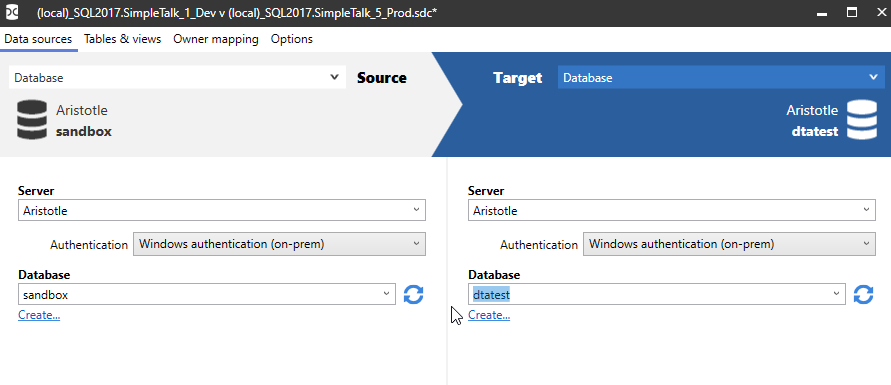
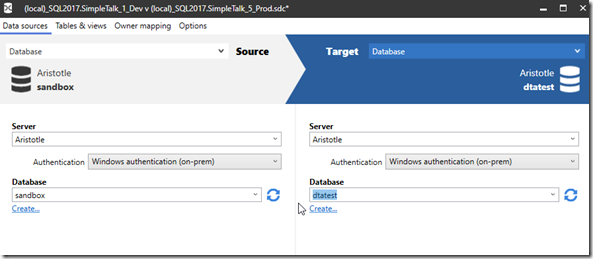
If I open SQL Data Compare, you get the default comparison. I’ll set this up with my two test tables:
2021-01-25 11_12_32-(local)_SQL2017.SimpleTalk_1_Dev v (local)_SQL2017.SimpleTalk_5_Prod.sdc_

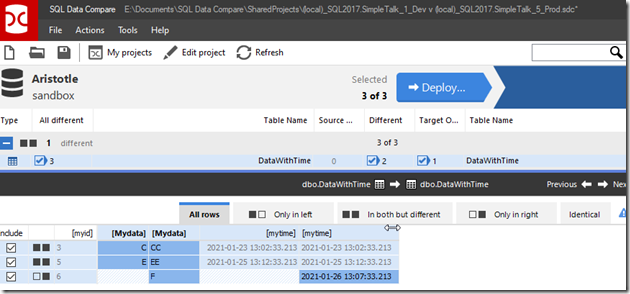
When I do the comparison, I see the differences between the tables. As you can see, I edited two rows and added one.
2021-01-25 11_13_25-SQL Data Compare - E__Documents_SQL Data Compare_SharedProjects_(local)_SQL2017.

That’s great, and in a table of a few rows, this isn’t an issue. What if this table has a million rows? Or a billion? I don’t want to scan everything.I want to limit things.

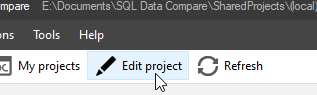
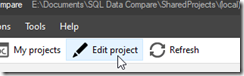
I can, if I click “Edit Project”.
2021-01-25 11_17_43-SQL Data Compare - E__Documents_SQL Data Compare_SharedProjects_(local)_SQL2017.

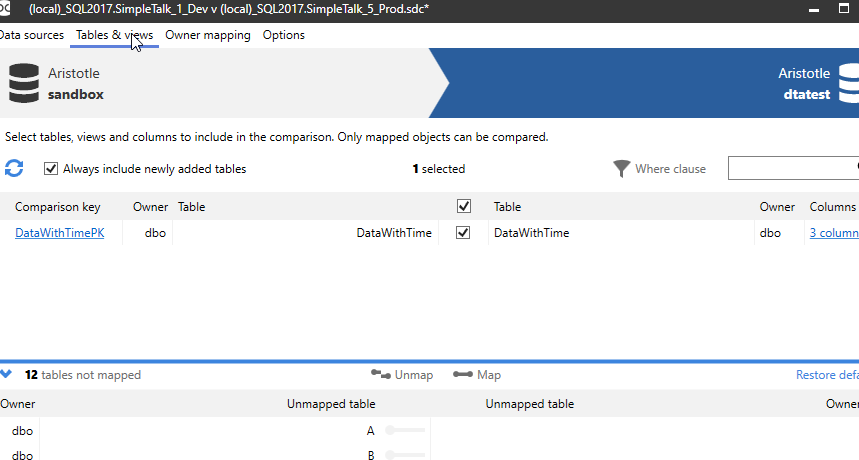
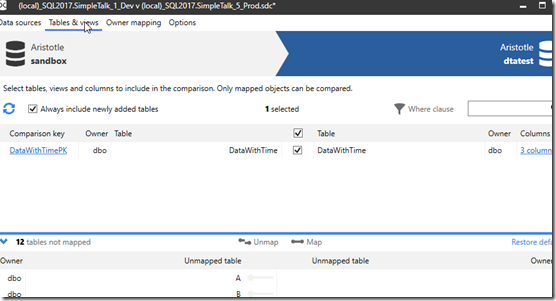
and then choose Tables and Views. I’ll see my table listed.
2021-01-25 11_17_59-(local)_SQL2017.SimpleTalk_1_Dev v (local)_SQL2017.SimpleTalk_5_Prod.sdc_

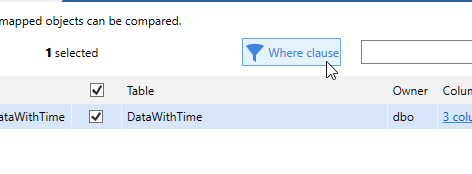
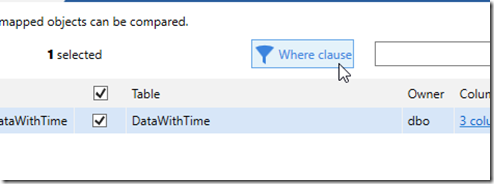
I can select the row with my table, DataWithTime, and then I can click the “Where clause” link in the upper right.
2021-01-25 11_18_06-(local)_SQL2017.SimpleTalk_1_Dev v (local)_SQL2017.SimpleTalk_5_Prod.sdc_

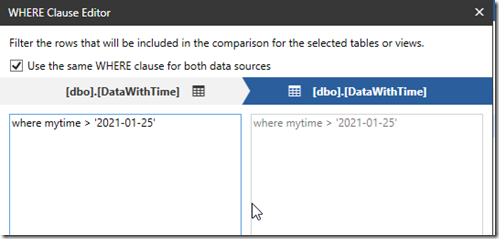
This pops up a dialog where I can enter a WHERE clause to be used for the table. I can set the same clause for both the source and target, or use separate ones. I’ll use the same one here.
2021-01-25 11_18_51-(local)_SQL2017.SimpleTalk_1_Dev v (local)_SQL2017.SimpleTalk_5_Prod.sdc_

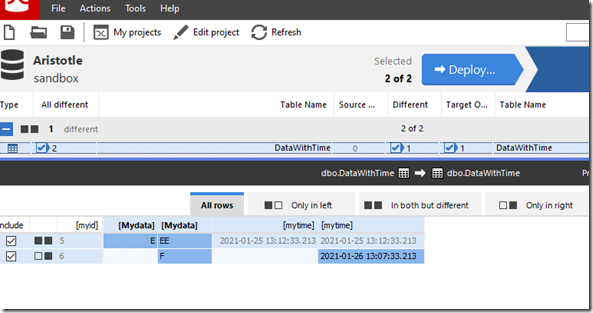
I can click OK for this and then Compare now to re-run the project. This gives me the data compared, but without looking at any data before the 25th of Jan. Notice only two rows below instead of 3.
2021-01-25 11_19_07-SQL Data Compare - E__Documents_SQL Data Compare_SharedProjects_(local)_SQL2017.

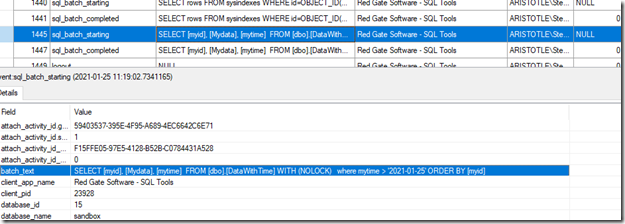
Am I sure this still didn’t impact my SQL Server with a large query? This works great with 5 rows, but what about 1billion? Well, I ran the XEvent Profiler while I was editing the project, and then filtered this down to the SQL tools. When I do that, I see this:
2021-01-25 11_21_16-ARISTOTLE - QuickSessionStandard_ Live Data - Microsoft SQL Server Management St

The query being issued has my WHERE clause, which filters out data at the query processing level. This doesn’t guarantee a seek or limited reads, but if I have the column indexed, then I would get an efficient a plan as I could get.

SQL Data Compare is fantastic tool for finding data differences. Comparing large volumes of data can be slow, but if you use filters, you can dramatically speed things up. If you haven’t tried SQL Data Compare, download an evaluation today and see what you think.


Posted in Blog | Tagged , , | 1 Comment