SQL Prompt Fixes Always Have an Else

SQL Prompt is a fantastic coding aid, but it does more than format your code and provide intellisense. Over time, the team has enhanced SQL Prompt to also guide you along and fix some bad code that your team might write out of habit.

SQL Prompt 10.1 released recently, and one of the recent fixes is for an issue that we’ve denoted as BP012. This is an issue where there is a CASE statement in code, but no ELSE has been defined. An example of this is shown below:

SELECT 
  oli.OrderLineItemKey
, oli.OrderID
, oli.qty
, CASE WHEN oli.qty < 10
         THEN oli.unitcost
     WHEN  oli.qty >= 10 AND oli.qty < 20
         THEN oli.unitcost * .05
     WHEN  oli.qty >= 20 AND oli.qty < 100
         THEN oli.unitcost * .1
     END AS UnitCost
, oli.linetotal
  FROM dbo.OrderLineItem AS oli

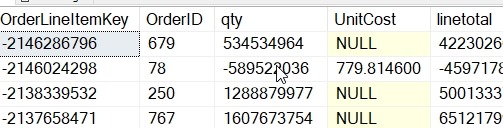
This is a problem because we often find some weird data being entered. You might think there will never be more than 100 ordered, but who knows. We should always have an ELSE clause, just in case.

Why? Here is why.
2020-04-02 12_03_42-SQLQuery7.sql - Plato_SQL2017.sandbox (PLATO_Steve (57))_ - Microsoft SQL Server

NULL is returned if you haven’t accounted for something.

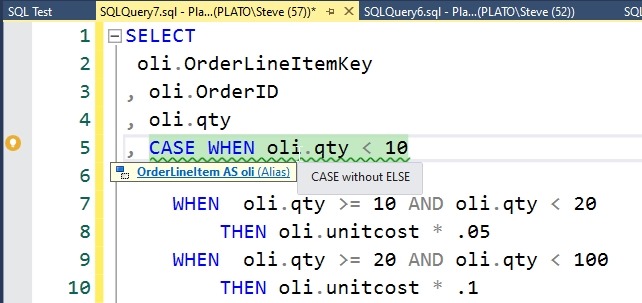
If you hover over, you get the issue in a tip. If you put the cursor on the line, you get the lightbulb with the fixes on the side.
2020-04-02 12_04_22-SQLQuery7.sql - Plato_SQL2017.sandbox (PLATO_Steve (57))_ - Microsoft SQL Server

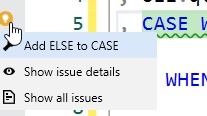
As with other fixes, you can click the light bulb and see the fixes.
2020-04-02 12_05_54-SQLQuery7.sql - Plato_SQL2017.sandbox (PLATO_Steve (57))_ - Microsoft SQL Server

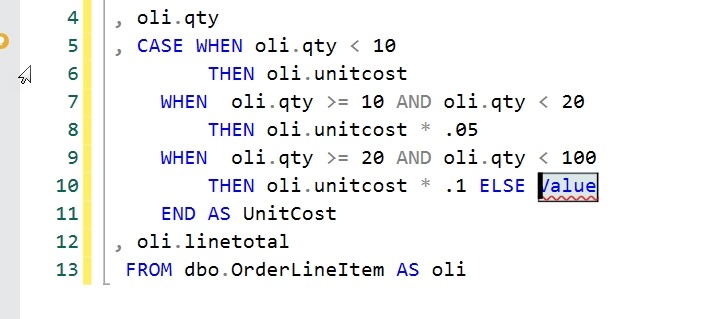
When we click the top item, SQL Prompt will add an ELSE clause, with a placeholder and the cursor is here. You can start typing, and enter the expression or value that is appropriate.
2020-04-02 12_06_03-SQLQuery7.sql - Plato_SQL2017.sandbox (PLATO_Steve (57))_ - Microsoft SQL Server

This is another place where junior (or overloaded) developers may make a mistake. Having this in SQL Prompt allows this to be caught by the individual developer. Having this in SQL Code Guard (part of SQL Prompt and our automated build/deploy tools)  and an automated build also means the code is evaluated automatically and this certainly doesn’t go to QA.

If you haven’t tried SQL Prompt, download an eval and see what you think. If you have it, upgrade and ensure you have all the code fixes.

Posted in Blog | Tagged , , | Comments Off on SQL Prompt Fixes Always Have an Else

Daily Coping 22 Apr 2020

I’ve started to add a daily coping tip to the SQLServerCentral newsletter, which is helping me deal with the issues in the world. I’m adding my responses for each day here.

Today’s tip is to look for the good in others and notice their strengths.

This has been a trying time, and the stress, the close quarters, the lack of variety, it’s made many of us cranky. Certainly it’s made me cranky at times.

Twitter is the worst, but all social media can test one’s patience. It doesn’t really matter which way you lean on an issue, there are plenty of people that will annoy you. Since social media is a bit of my job, I’m slightly trapped at times.

What I’ve done is to a) try to stop reacting, and b) appreciate the other point of view. I know most people with a strong opinion that differs from mine are not looking to make things worse. They often have a reason for their own view of the world, and I am trying to take a deep breath, respect that, and then think about things from their point of view. It’s helping.

When I can actually avoid reacting quickly.


Posted in Blog | Tagged , , | Comments Off on Daily Coping 22 Apr 2020

DAX and Power BI Stairway Live

As part of the Redgate Community Circle, I’m going to be running a live class on DAX and Power BI, every Thursday, from 12MDT for about 30-45 minutes. We’ll see how things go.

I’ve been wanting to learn DAX and I keep putting it off. I can google with the best of them and fumble through things, but that’s not ideal. And it might not be correct, as I’m not sure I’m always writing the code that I need, or the best code. So I want to walk through Bill Pearon’s Stairway to DAX and Power BI live.

Join me and we’ll work through the series, learning some DAX and applying it to Power BI, which will be interesting. I will read the articles ahead of time, and download anything I need, but for the most part, I’ll be fumbling along with you.

If  you’ve got time, join me live. The webinar link is here, and you’re welcome to join, for the whole time or just a part. I anticipate things going for 30+ minutes, but I’ll cut off at an hour. Feel free to participate and as long as we don’t have too many people, we can all discuss the article and try things out live.

For security, I’m not directly posting details, but here is some of it.

Posted in Blog | Tagged , , , | Comments Off on DAX and Power BI Stairway Live

Server Side SSMS

SSMS is a large monolithic application built on the Visual Studio shell. It’s slow to start, heavyweight, resource intensive, and can be a resource hog. It’s also indispensable for many SQL Server DBAs.

I grew up using various SQL Server tools. We had isql for Windows early on and then Enteprise Manager before SQL Server Management Studio (SSMS) was built. Now we also have Azure Data Studio(ADS), though arguably for many administrators and DBAs, ADS doesn’t have enough capabilities to supplant SSMS. That may change, but for now I find myself sticking with SSMS for most of the code writing I want to do.

Many people install SMSS on the database server itself, and many other people refuse to do so. Most experts agree that running SSMS on the server itself is a bad idea, though that doesn’t stop some people from doing so on a regular basis. While I agree with Andy Mallon that we should install SQL Server on a server, I also agree that we shouldn’t use it.

That seems counter intuitive doesn’t it? Install it but not use it? Why install it in the first place?

When there is a crisis, you will want this tool. It’s familiar, it has all the wizards, dialog boxes, and tools that many solutions will describe when you frantically search for a solution to a problem. It’s also the best way to get something done if you have to connect from a remote location. Even if your laptop connects, sometimes networking issues, long query times, and more mean you will want local execution of queries, not remote calls from SSMS on a workstation. After all, if something happens to your client, you don’t want your query to rollback.

Andy has a good list of reasons, as well as a few tips to avoid running SSMS on the server. For me, I’d recommend a dedicated jump box, server or workstation, where users can RDP to this dedicated box and run SSMS from there. Why? It’s becoming more common as organizations try to implement better security. They often do this by limiting access to production from most workstations. In fact, for some clients, that’s the only way they can connect to production. I expect that to become more prevalent than not in the future, so I’d suggest you get comfortable with another solution now.

Steve Jones

Listen to the podcast at Libsyn, Stitcher or iTunes.

Posted in Editorial | Tagged | Comments Off on Server Side SSMS