Tag: backup

  • Backup Your Certificate for TDE

    If you’ve enabled TDE, you need to be sure you have a copy of the certificate that protects the Database Encryption Key (DEK). If you follow my instructions, then you have one.

    If you didn’t make a backup, or you have just discovered a TDE database, make one now, and secure the password you use with your DR materials (off site).

    How do you make a backup? That’s easy. Use the BACKUP CERTIFICATE command. Here’s the command I use in demos:

    USE master
    ;
    go
    BACKUP CERTIFICATE TDEPRimer_CertSecurity
     TO FILE = 'tdeprimer_cert'
      WITH PRIVATE KEY (
                   FILE = 'tdeprimer_cert.pvk',
                   ENCRYPTION BY PASSWORD = 'AStr0ngB@ckUpP@ssw0rd4TDEcERT%')
    ;
    go


    The certificate for TDE is in master, so you must make sure you’re in master for the backup. The TO FILE option lets you choose the file path. By default, this will be in the DATA folder for your instance, but you can choose other locations. You can give an extension if you like. This file is the certificate (public).

    There is a private key portion of the certificate, which is backed up with the “WITH PRIVATE KEY” portion of the command. This is where you specify the password and provide the protection for your certificate.

    You will need this password on restore, so keep track of it.
  • Restoring a TDE Database on a New Instance

    You’ve enabled Transparent Data Encryption (TDE) on one of your databases, and the server has failed. How do you get this database working on a new instance? This short post will show you how this works.

    Files Needed

    There are two files you need in order to restore the database.

    1. A full backup of the TDE database
    2. A backup of the server certificate that protects the Database Encryption Key (DEK).

    You might have multiple files for the backup, and potentially other backup files (diff, log), but the process for those will be the same as any other restore once you complete this process.

    If you have multiple full backup files (striped backup), just include them in the restore command as you normally would.

    Prepare the New Instance

    To prepare the new instance for restore, you need to ensure that you have a database master key (DMK) in the master database. You can do this by checking the master_keys DMV.

    SELECT * FROM sys.symmetric_keys


    If you have a key, that’s fine. If you don’t, you can create one like this:

    CREATE MASTER KEY ENCRYPTION BY PASSWORD = 'sdkj3G3$sh'

    Now you need to restore the certificate from your source instance. You do this with the CREATE CERTIFICATE command, and the FROM FILE option. You’ll typically find the backup from your BACKUP CERTIFICATE command in the DATA folder for SQL Server if you didn’t specify a complete path.

    You do have a backup, right?

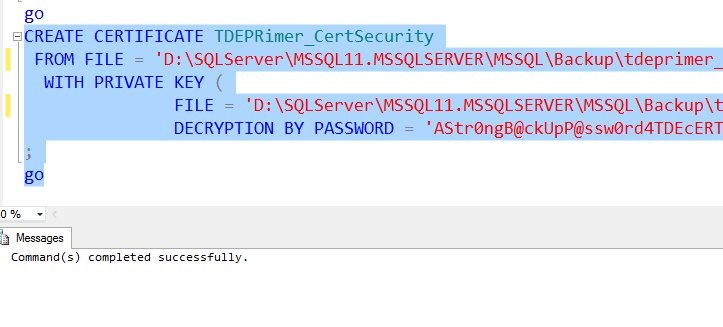
    For me, I’ll run the create certificate command:

    CREATE CERTIFICATE TDEPRimer_CertSecurity FROM FILE = 'D:\SQLServer\MSSQL11.MSSQLSERVER\MSSQL\Backup\tdeprimer_cert' WITH PRIVATE KEY ( FILE = 'D:\SQLServer\MSSQL11.MSSQLSERVER\MSSQL\Backup\tdeprimer_cert.pvk', DECRYPTION BY PASSWORD = 'AStr0ngB@ckUpP@ssw0rd4TDEcERT%') ; go


    This works

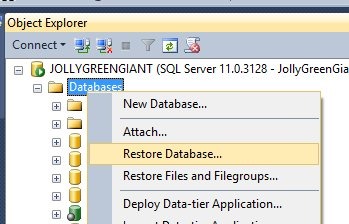
    tde_a

    Now I’m ready to restore the TDE database.

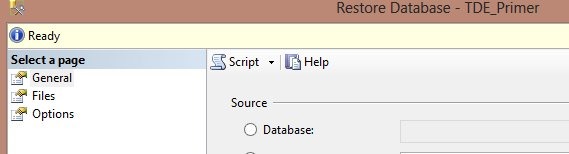
    tde_b

    I select my backup file, and everything proceeds as a normal restore. How do I know the certificate worked?

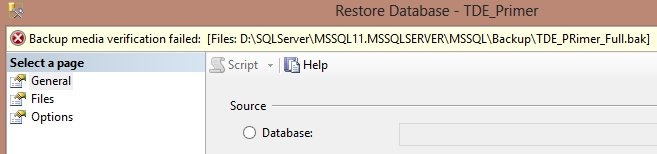
    Because I have a “Ready” at the top of the dialog.

    tde_c

    If I didn’t have the certificate on the instance, I’d get this:

    tde_d

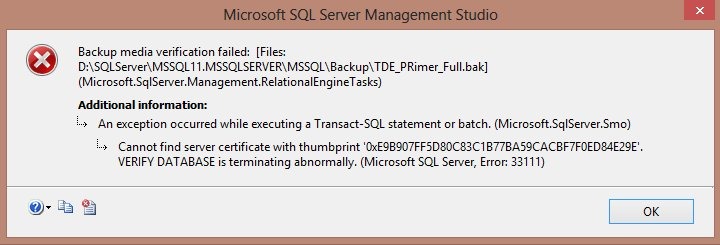
    Double clicking that would bring up the error:

    tde_e

    If the certificate is not on the instance, then the server cannot decrypt the DEK and restore the database.

    Hope this helps, and if you use TDE, make sure you can do this.

  • The DBA Team #1–Code and Slides

    Our first DBA Team event, in Richmond, VA just before SQL Saturday #187 went well. Overall I think our experiment was a success and we’re already talking about where and when we might do this again.

    In the meantime, we didn’t make a separate site for this series of events, being an experiment and all. I’m adding this post as a placeholder for the various slide decks and code.

    Core Monitoring for SQL Server (Steve Jones)

    Good DBAs ensure that they are always aware of the state of their instances. All systems should have monitoring in place, not just so you know when things go wrong, but so you understand what a normal workload looks like and can plan for the future. This session will cover the basics of monitoring a SQL Server system and the various metrics you should be tracking.

    Getting Started with SQL Server Backup (Grant Fritchey)

    Backups are fundamental to protecting the investment your business has in its data and they’re the foundation of disaster recovery planning. We’ll go over best practices for database backups, to ensure you’re establishing that foundation correctly within your systems. This introductory level session covers full, log, and differential backups, as well as restores and restores to a point in time. Come along to be sure you’ve got the right protection in place for your systems.

    Understanding Database Corruption (Grant Fritchey)

    A DBA’s primary purpose is to ensure that the information in their charge is accessible by the correct people within their organization. Despite everything you do to make sure you’ve got your servers configured, monitored, and tuned, with well-tested backups in place, you can still lose data through corruption. But what is corruption in a database? This session lays out exactly where database corruption can come from, how to find out exactly where the corruption is within a database, and  the methods you have available to recover from database corruption.

    Indexing for SQL Server (Steve Jones)

    Indexes are important for improving the performance of your queries, but they add overhead to your server and require maintenance. This session examines how indexes work and the basic maintenance that you should perform to ensure your system is running at its peak level.

  • The Backup Process

    This used to be my backup process. Five copies, one for each day of the week.
    This used to be my backup process. Five copies, one for each day of the week.

    I was reading Scott Hanselman’s post onThe Computer Backup Rule of Three, and I completely agree with him. If things are important, three copies are the minimum you should keep. I have had backups before, but I’ve found that when something breaks, like a tape drive or hard drive, I might not get to replace it right away. Usually this is procrastination, or as it’s more commonly known, laziness. During that window of opportunity, I’ve had Mr. Murphy strike. My inherent paranoia of having that second extra copy has saved me, both personally (at home) and professionally (at work).

    All too often I run into DBAs that seem to trust and assume their backups and processes are very reliable. After setting up a backup process, usually to disk, and testing it with a restore on another system, they assume it will work in the future. It should, but there is always the chance something will fail at some point in time. There’s the chance that some hardware failure or software reconfiguration will cause an issue with your process. There’s also the simple chance that your I/O system might introduce corruption into your backup files.

    If you aren’t regularly testing your processes, you can’t be sure they are working as they have in the past. The ideal environment would perform a restore of every backup file taken, every day, but that isn’t always possible. However restoring a random backup once every month or two will help you to ensure your backup, and restore, processes, have the best chance of succeeding when you actual need to perform them because of a disaster.

    This isn’t hard to script and automate, but it is something you need to do periodically. However even if you automate restores of all your databases, make sure you still practice your manual skills regularly. Automation might not work in a disaster situation, but those quarterly practice sessions restoring a database to a point in time with a tail log might just relax you when a crowd in your cube is asking if the database will be back up soon.

    Steve Jones


    The Voice of the DBA Podcasts

    We publish three versions of the podcast each day for you to enjoy.