Tag: Excel

  • Chopping Off Data

    Do you know the difference between XLS and XLSX? They’re both Excel formats, and many of us might just use one or the other. After all, the latest versions of Excel work with both, and if you’ve been using a spreadsheet for years, perhaps you stick with the older format when exchanging data with others.

    As many of you might have seen, Public Health England recently learned there is a difference with large amounts of data. They found data was being chopped off in a spreadsheet because they were using the old XLS format, which only supports 65k rows. The newer XLSX format will support a million rows, but both numbers are far below what SQL Server, MySQL, PostgreSQL, and other platforms support. Those platforms support billions, and most are limited only by the storage available.

    I know that pandemic has had many groups scrambling to assemble and analyze data. We have people building dashboards and gathering data together in numerous ways, from paper and pencil to Excel to (hopefully) enterprise databases. An import into a relational store would make more sense than Excel, but I also understand that setting a schema, dealing with ETL and different formats from different sources, and other issues are a pain. There is a reason data professionals get paid a lot of money for these tasks.

    To me, this highlights one of the issues of working with SQL Server, MySQL, PostgreSQL, etc., in that they are cumbersome and difficult to get started with. Even if scientists chose Cassandra or MongoDB, there would be issues, because there aren’t easy, simple client tools that facilitate work with data sets coming in disparate text files and formats.

    I don’t mean to excuse this, because IT professionals should know better. If you’re using XLS, stop. Data volumes increase and you don’t want to realize you’ve hit the limit after data is lost.

    I get the ease and convenience of using Excel, but stop using it for major projects once we realize these are important. Once you realize this is data that needs to be intact, secured, and protected, put it in a real platform. Excel, PowerBI, and most tools can query SQL Server.

    Use those tools where you need them and where you can, just don’t use them as your database.

    Steve Jones

    Listen to the podcast at Libsyn, Stitcher or iTunes.
  • What’s the Mashup Engine?

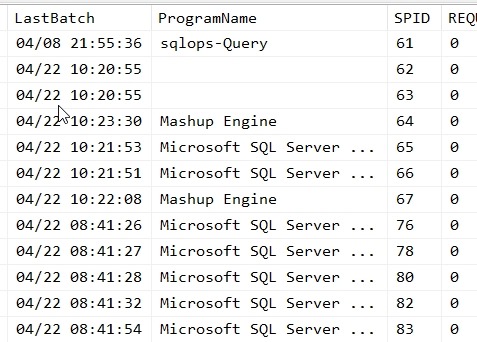
    I was testing something the other day and ran sp_who2 on a test instance. I saw this in the program listing:

    2019-04-22 10_52_34-SQLQuery13.sql - Plato_SQL2017.sandbox (PLATO_Steve (57))_ - Microsoft SQL Serve

    I had never seen the Mashup Engine listed in a program list, and I certainly don’t have any program installed by that name.

    Or do I?

    I actually do. It’s embedded in Excel 2016, as part of Power Query. Fellow MVP, Reza Rad, has a good introduction to what this actually is. Apparently it’s the engine that makes it easy for data movement and transformation. Kind of an SSIS light, that’s a part of Power BI as well.

    If you see this on your instance, you’ll know that someone is connecting with another tool. As to which one it is, that might be harder to determine.

  • Getting the Hyperlink from Excel

    I had a spreadsheet of data that contained hyperlinks. In this case, it was a series of Microsoft Knowledge Base Articles with a hyperlink associated with them. I would assume there’s an easy function in Excel to extract these, but apparently there isn’t. That’s certainly a useful function for a data person.

    I turned to the handy, dandy Google and found this Q&A and Superuser. I needed to delve back into VBA and build a macro, which is easy, but seems silly. In any case, I pasted this in and then set a formula based on a cell.

    And got a 0 in the field. I started to try and debug this, before trying another cell. That one worked. Apparently some of my cells, formatted as blue, underlined text, don’t really have formulas.

    No big deal, but good to know.

    Here’s the macro formula repeated from the post, just in case.

    Function GetURL(cell As range, Optional default_value As Variant)
     'Lists the Hyperlink Address for a Given Cell
     'If cell does not contain a hyperlink, return default_value
          If (cell.range("A1").Hyperlinks.Count <> 1) Then
              GetURL = default_value
          Else
              GetURL = cell.range("A1").Hyperlinks(1).Address
          End If
    End Function
  • Adding Minutes in Excel

    A short one, but I found myself wasting time recently. I use an Excel sheet to schedule some items out each day. It’s not my choice to do this, but the service I use requires this to not manually set time for each event.

    Tl;dr: Add minutes/1440 to the date.

    The format looks like this:

    2016-02-05 09_42_25-Settings

    I’ve been changing the dates each day to the next day, which involves picking the cell, hitting F2 (or clicking the mouse), moving to the day and editing it to increment. In this case, I’d go to the 10th for the next set of scheduled items.

    Manual, time consuming, and when I saw this cartoon, I knew I needed to do something else. It’s a few minutes of my day, and really, it’s 12 hours over 5 years.

    is_it_worth_the_time

    But it’s incredibly annoying and tedious. It makes my blood pressure rise, and I delay the work because of it.

    I spent 5 minutes considering a few things. I knew I could do any of these, but some would require more work than others, and perhaps not be worth the time.

    • Use a macro to change each entry
    • Get my source system to generate an Excel sheet in this format
    • Write OLE automation to generate a new sheet

    In the end, the simple solution was just learn to add time to a base date. If I take the first entry, I can see that I’m really adding minutes (or hours) to this one. So I decided to do that. In this way, I still need to edit the first cell, but then all the rest will work.

    However I needed to add minutes to an Excel entry. I wasn’t sure how, but a quick Google search gave me the answer from Superuser. Because of how Excel stores dates, I really need to add minutes divided by 1440 to the date.

    So my first date is: 02/09/16 14:05. To get my next entry, which is 02/09/16 14:22, I need to add 17 minutes, but the forumla looks like this:

    2016-02-05 09_50_19-Settings

    As you can see, that’s the right time. I now had to spend about 10 minutes setting the formula for each time, which is a matter of calculating the minutes for each new time. It’s not too hard, and my ten minutes spent here won’t pay off in time for a long time, especially after this blog post, but it will reduce my stress quite a bit.

    Every day.