

Another post for me that is simple and hopefully serves as an example for people trying to get blogging as #SQLNewBloggers.
One of the common tasks that many DBAs need to do is insert data into a database. Often this comes from various sources, but a CSV (comma separate value) format is common. One could use the data import wizard, but that seems to be very flaky with CSVs, so I’ll show a quick way to use the BULK INSERT command.
This command is a way to read files and load them into a table, similar to how bcp works. However, this is a T-SQL command, and can be included inside your database.
The basic format is
BULK INSERT <table>
FROM <source>
WITH <options>
For most CSV imports, this means we need to pick a table, in my case, the BuildStaging table, and a source file. My statement looks like this:
BULK INSERT dbo.BuildStaging
FROM ‘e:\Documents\ssc\BuildList_SQLServer2014.csv’
I also need some options. The basics for a CSV are:
WITH
( FIELDTERMINATOR = ‘,’,
ROWTERMINATOR = ‘\n’
);
There could be other items you want to enable, and there is quite a list. In my case, my file looks like this:
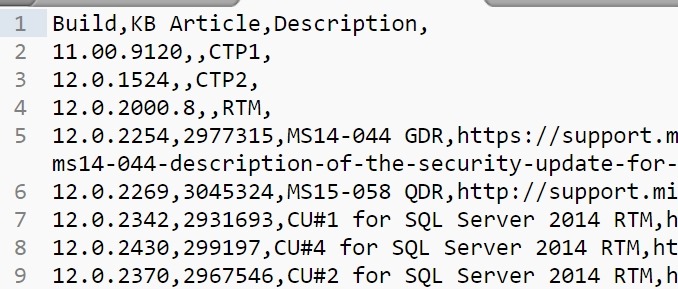
I have a header row, so let’s get rid of that by adding a FIRSTROW = 2 option.
Now when I run my command, the data is inserted.

From here, I need to work with the data and clean it futher for insert into other tables.
SQLNewBlogger
This was a quick task I needed to accomplish. I knew most of the syntax, but had to double check the option names, and ended up taking about 2 minutes to import the data and 10-15 to write this post.
And, I’ll likely remember how to do this import after spending time writing about it.


 Voice of the DBA
Comments
2 responses to “Bulk Inserting Build Data–#SQLNewBlogger”
I always forget about Bulk Insert. I usually just fire up an SSIS package using the import wizard in SSMS. Thanks for the reminder!
LikeLike
I wrote this because a simple SSIS import wizard didn’t work with my csv. I seem to find more CSVs don’t just work, but BULK INSERT seems to.
Glad you liked the piece.
LikeLike