Friday Flyway Tips: Copying the Migration Number

It’s a small thing, but copying the migration number can be a pain. However, we’ve made this easier in Flyway 6.5.4.

I’ve been working with Flyway Desktop for work more and more as we transition from older SSMS plugins to the standalone tool. This series looks at some tips I’ve gotten along the way.

Lots of Migration Numbers.

I’ve got a lot of migrations in this project. You can see below in the image, noting the scroll bar goes up and down here.

2023-08-10 12_30_54-Flyway Desktop_thumb[1]

These are easy to read numbers, but some companies use dates and times. Like this:

2023-08-10 15_06_25-Flyway Desktop

Those are harder to read, but more importantly, easy to mis-type. If you were using flyway migrate or undo with a specific version, you don’t want to make a mistake.

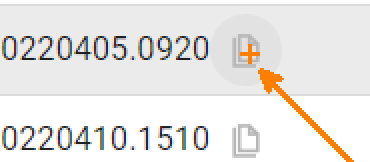
We’ve made it easy in Flyway. We added a copy button, which you can see below. This is to the right of each migration. I missed this until a dev pointed it out.

2023-08-10 15_06_38-Zoomit Zoom Window

If I click this, the version is copied. I can paste it into the search, as shown here.

2023-08-10 15_06_57-Flyway Desktop

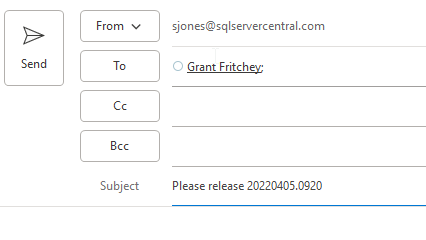
Or an email.

2023-08-10 15_07_18-Untitled - Message (HTML)

A small change, but a handy one. One way to make working with Flyway smoother and reduce mistakes. That’s a big part of DevOps, trying to reduce mistakes.

Of course, you have to click the right line. Winking smile

Try it out today. If you haven’t worked with Flyway Desktop, download it today. There is a free version that organizes migrations and paid versions with many more features.

Video Walkthrough

I made a quick video showing this as well. You can watch it below, or check out all the Flyway videos I’ve added:

Posted in Blog | Tagged , , , | 1 Comment

Taking Advantage of Conferences

I’ve been very lucky in life to go to many conferences throughout my career. I’ve gone as both an attendee and a speaker, and I have found them to be valuable in helping me continue to grow and thrive in my career. This is across many employers, some of which I don’t think had particularly great benefits. Plenty of people I worked with did not get to attend any conferences, and some of them felt resentful. I understand that, but I think that many employers are willing to invest in training and conferences when there is a return for them.

I started going to ComNet in DC, as a young professional wanting to learn. It was close enough to drive up and go for the free day and then return home. A few colleagues and I would make the trip once a year and talk with vendors, chat with attendees, and learn more about computer networking. Across a couple of years, we had moved from thinnet and thicknet to ethernet and IPX to IP, and this was a place where those technologies, and many more, were being discussed.

During (and after) the event, I worked hard and improved my knowledge. I got things done at work. I got extra things done at work. I got my normal work done better. I solved more problems than in the past. Part of this was growing and learning, part was improving my troubleshooting, research, and testing skills.

Some of it was meeting a few people at a conference I could email later and ask a question.

As I changed jobs, I moved more into development and data work. I got the chance to go to TechEd and the PDC. I became involved in PASS and started attending the annual summit. I learned a lot in different sessions, and I made a lot of networking contacts with others. Many became friends, and many of them have helped me answer questions since then. I learned to not just attend a conference, but bring something back. Usually knowledge and always some swag to give out to co-workers. A gift for the boss that approved the trip was also a good idea.

I continue to do this today. I often attend a SQL Saturday and sit in a few sessions. I still learn something that I can write about or help a client with. I might take a moment to ask a speaker a question that likewise gives me knowledge that I can use in my day job. There’s a payback for my employer when they’ve spent money for me to attend. There’s also a payback for my career as I’m always learning something new.

This fall is the annual PASS Data Community Summit. It’s in-person, which I know limits who can go, but if you’re looking to be a high performer. If you get things done at work and your company values you, perhaps you can make a case that you are the person that will take advantage of a conference. Convincing others that you’re worth investing in, and proving you are, is a good skill to have. Take your best shot at it, and maybe you’ll get the chance to register and come. If not, the worst case is someone says no but learns that you want to drive your career forward.

PS – Don’t delay. Prices rise on Sep 21.

Steve Jones

Listen to the podcast at Libsyn, Stitcher, Spotify, or iTunes.

Posted in Editorial | Tagged , | Comments Off on Taking Advantage of Conferences

A New Word: Rückkehrunruhe

rückkehrunruhe – n. the feeling of returning from an immersive trip only to notice if fading rapidly from your awareness, as if your brain had automatically assumed it was all just a dream and already went to work scrubbing it from your memory.

I feel like rückkehrunruhe happens at the end of quite a few trips. Certainly all the volleyball ones where I’m coaching. Such an intense emotional experience competing with a team, but not doing much more than providing light guidance. I don’t get on the court and can do little to affect the outcome in the moment.

However, I also felt this recently after coming back from That! Conference in Wisconsin. 3+ days in a fun, scout-camp-meets-tech-conference atmosphere and back to work. I think having a 30 hours turnaround at home before reading to the wedding also made the transition back from the work event to life full of rückkehrunruhe.

From the Dictionary of Obscure Sorrows

Posted in Blog | Tagged , | Comments Off on A New Word: Rückkehrunruhe

Adding Copilot to Azure Data Studio and a Few Experiments

As a part of a recent Data Exposed that I was on, there was an ADS update which mentioned Copilot being added. Since I’ve been experimented, I decided to give this a try.

This is part of a series of experiments with the ChatGPT and other AI systems. Lots of Copilot lately.

Installation

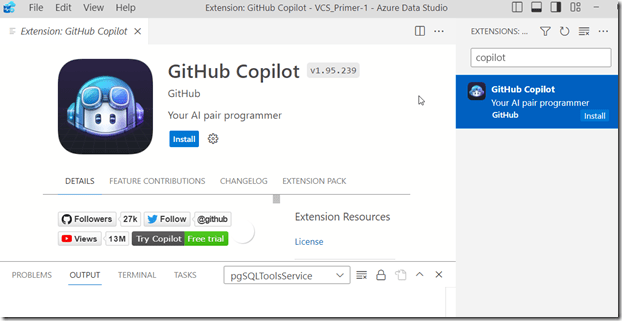
One of the easy things about VSCode and ADS is that you can install things from the marketplace very easily. You search and it appears, as shown here. Click Install to add it.
2023-08-02 12_33_05-Extension_ GitHub Copilot - VCS_Primer-1 - Azure Data Studio

Once you do this, it’s enabled. I have access to the Copilot with my GitHub account, so I assume this picked this up.

Using Copilot in ADS

There’s a blog about what this tech is and a few workflows. However, I decided to try something first. I picked a table in this connection and started typing. Copilot added a suggestion.

2023-08-02 12_40_32-● SQLQuery_1 - Aristotle_SQL2022.sandbox (Integrated) - VCS_Primer-1 - Azure Dat

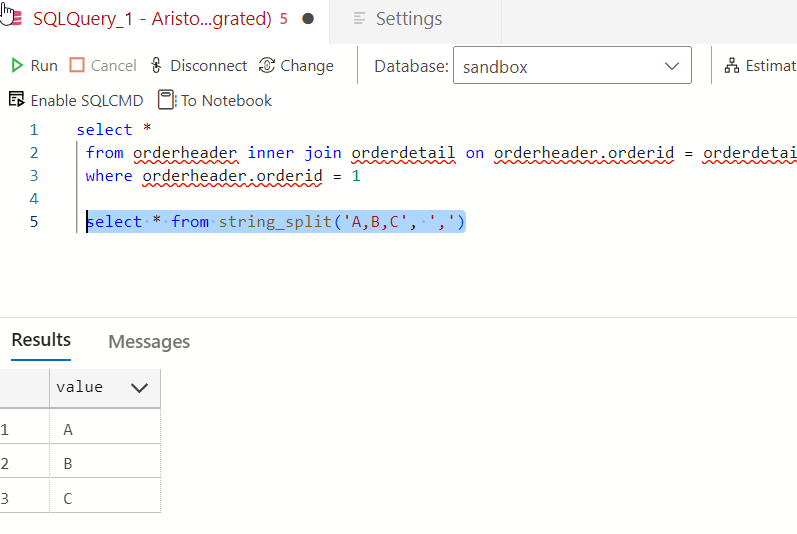
It’s not a good one. That’s a table, not a function.

2023-08-02 12_40_51-● SQLQuery_1 - Aristotle_SQL2022.sandbox (Integrated) - VCS_Primer-1 - Azure Dat

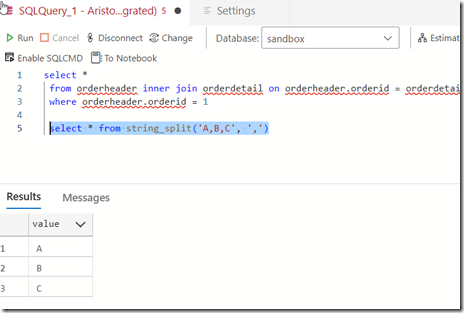
Yeah, some AI isn’t reading my schema and sending it back to GitHub. Boo, this isnt’ helpful. I can only guess that seeing “StringSplit” had the AI guessing this was related to string_split(). Something a new dev might think.
2023-08-02 12_47_56-● SQLQuery_1 - Aristotle_SQL2022.sandbox (Integrated) - VCS_Primer-1 - Azure Dat

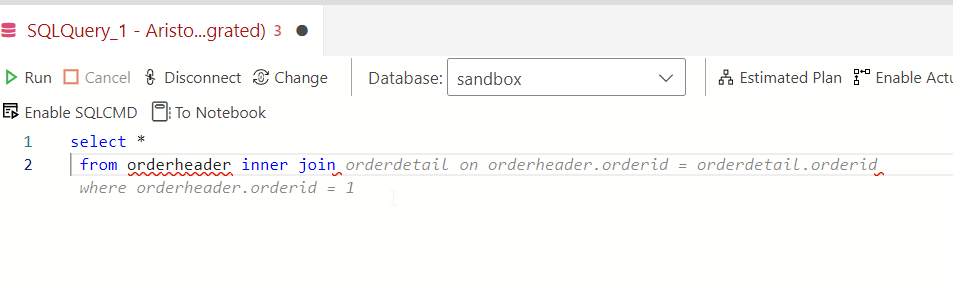
OK, let’s pick a table and see if intellisense works better. I’m guessing it doesn’t. Here’s a suggestion based on what I typed.

2023-08-02 12_43_04-● SQLQuery_1 - Aristotle_SQL2022.sandbox (Integrated) - VCS_Primer-1 - Azure Dat

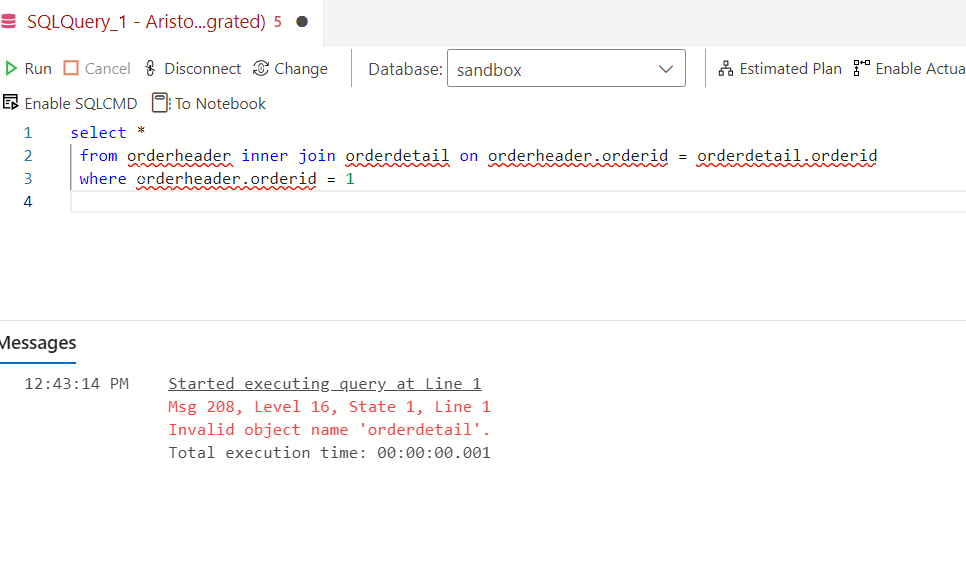
Not a bad guess. I have some schema in here, and there is an OrderHeader related to a Customer table. However…

2023-08-02 12_43_24-● SQLQuery_1 - Aristotle_SQL2022.sandbox (Integrated) - VCS_Primer-1 - Azure Dat

There is no orderdetail. This clearly isn’t intellisense. It’s an AI taking guesses.

Trying Comments as Prompts

Let me try a few things from the blog. I’ll enter a comment.

2023-08-02 12_50_25-● SQLQuery_1 - Aristotle_SQL2022.sandbox (Integrated) - VCS_Primer-1 - Azure Dat

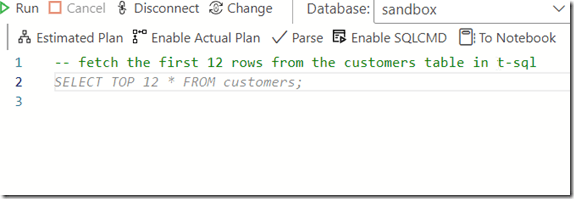
I don’t like that. While I think this is valid for MySQL or PostgreSQL, it isn’t for SQL Server. Setting aside why LIMIT isn’t in T-SQL, why doesn’t copilot recognize this is T-SQL? Let me help it.
2023-08-02 12_54_06-● SQLQuery_1 - Aristotle_SQL2022.sandbox (Integrated) - VCS_Primer-1 - Azure Dat

Better, but I don’t want to add “in T-SQL” to everything.

Another experiment. I tried a couple of prompts, but realized that asking for “orders” doesn’t mean that the AI knows I mean orderheader. Context around what or where an order is stored is something humans might include in natural language. However, I got this:
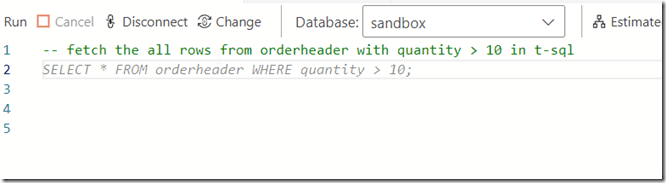
2023-08-02 12_55_26-● SQLQuery_1 - Aristotle_SQL2022.sandbox (Integrated) - VCS_Primer-1 - Azure Dat

Which doesn’t work. I’d left the “in t-sql” from the previous prompt, so I’m not annoyed there, but this isn’t looking at schema. I also find the Oracle help not helpful.

2023-08-02 12_55_36-● SQLQuery_1 - Aristotle_SQL2022.sandbox (Integrated) - VCS_Primer-1 - Azure Dat

However, this was interesting. I wanted a shipdate (this is a column) in 2023. The first suggestion was = Jan 1, but when I deleted that and hit enter again, I got this.

2023-08-02 12_58_12-● SQLQuery_1 - Aristotle_SQL2022.sandbox (Integrated) - VCS_Primer-1 - Azure Dat

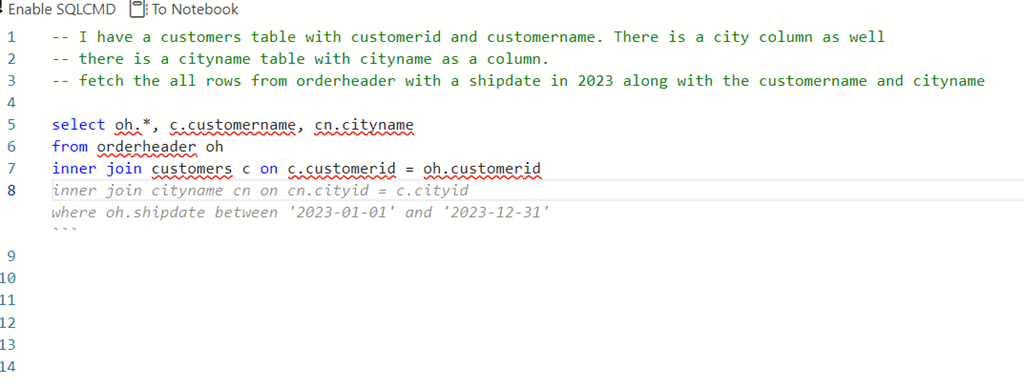
Not bad. I tried a longer prompt, with a few comments. All of the code was suggested a line at a time, and when I hit Enter, I got the next line.
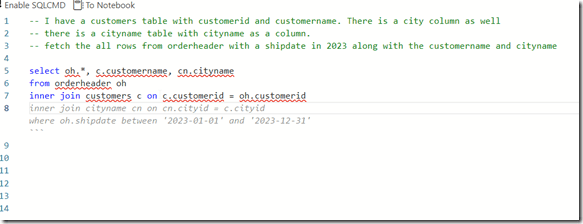
2023-08-02 13_00_38-● SQLQuery_1 - Aristotle_SQL2022.sandbox (Integrated) - VCS_Primer-1 - Azure Dat

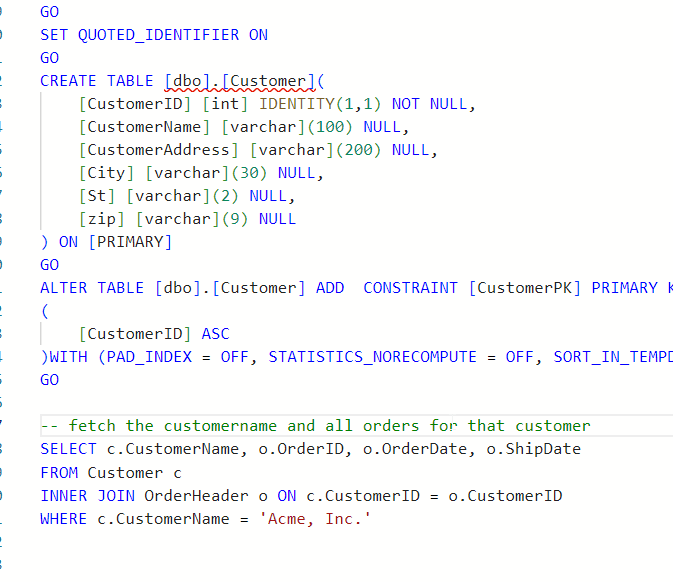
The blog does note that adding the table create at the top of the query helps. Let’s try that.

I’ll add creates for customer and orderheader. I then try a simple prompt and get this.
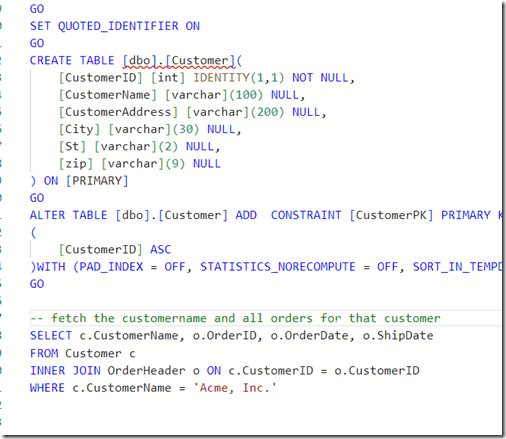
2023-08-03 15_19_54-● SQLQuery_2 - dbo.OrderHeader Aristotle_SQL2022.sandbox (Integrated) - VCS_Prim

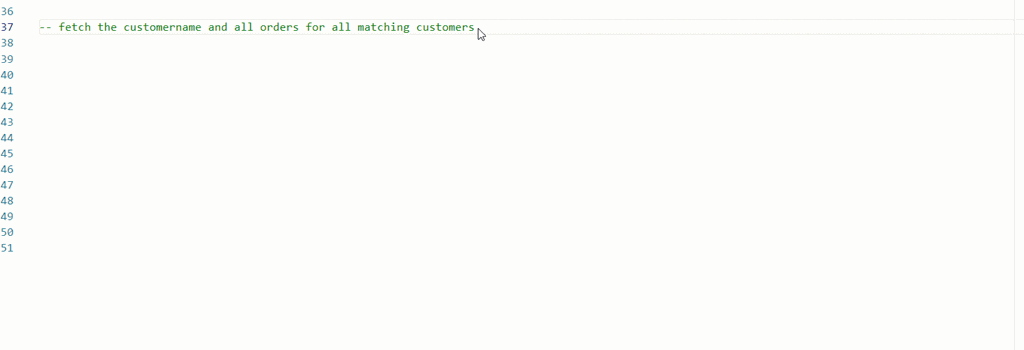
Note, I tried “write a query”, but that didn’t work. I used “fetch” from the blog and that got me something. Though, not sure why this term is needed.

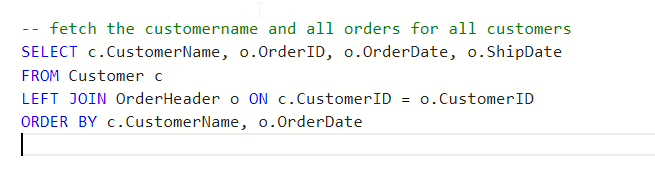
I also changed my prompt trying to get all matching orders and got this instead.
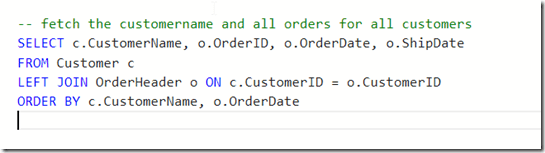
2023-08-03 15_20_20-● SQLQuery_2 - dbo.OrderHeader Aristotle_SQL2022.sandbox (Integrated) - VCS_Prim

I also tried changing this to get matching orders. No idea why the customer name is limited in here.
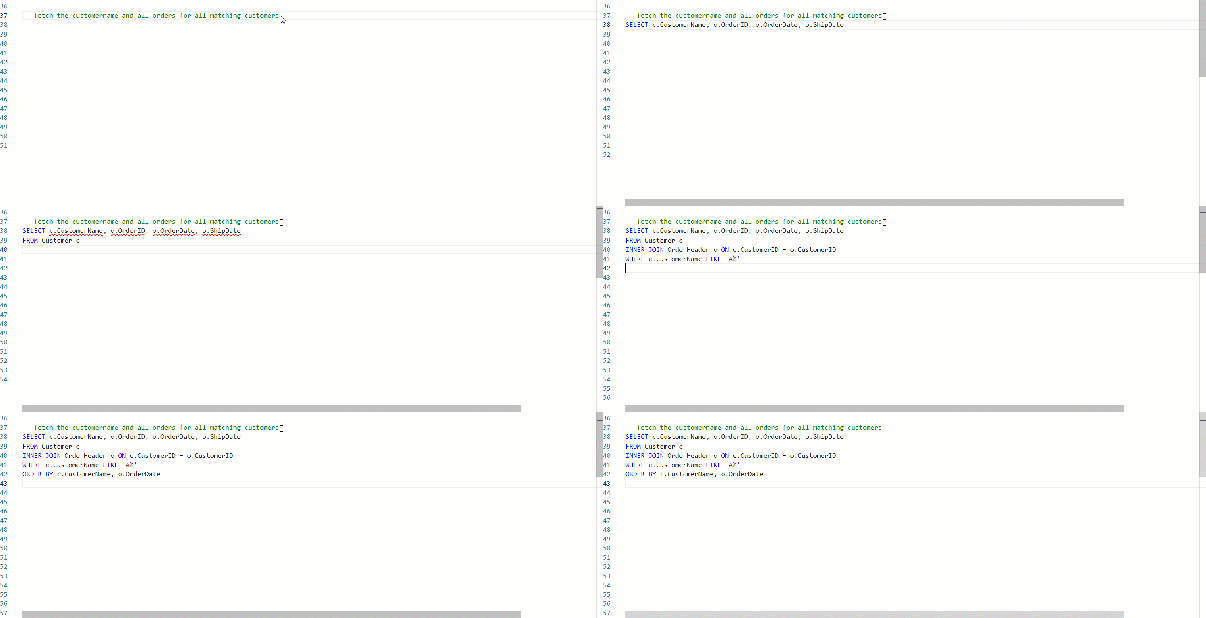
ads_query_1

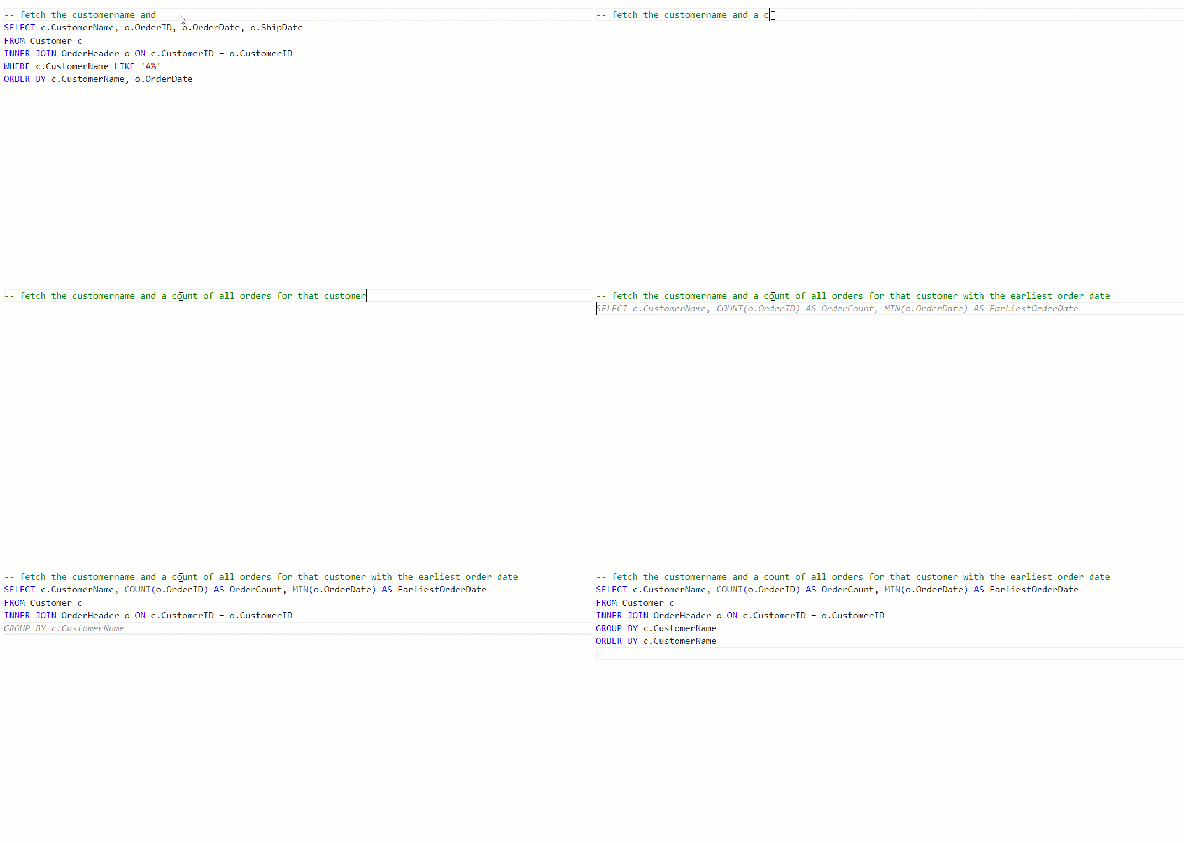
What about aggregates? I know some people have trouble with these.
ads_query_2

Not bad.

Conclusion

Adding Copilot to ADS is easy, but using it isn’t. The code it produces can have lots of mistakes, and not even work. It can make some strange assumptions, like junior devs might do.

Adding context makes things better, but for many of these simple queries, I have to describe things enough that I might as well write the query. Especially with SQL Prompt, I’d use SSMS instead.

However, learning to use prompts is a skill and it’s one to work on. Hopefully the AI will improve over time and I’ll start to see more useful suggestions, especially with different types of code.

So far, I’m impressed very little with this tool.

Posted in Blog | Tagged , , , , | 2 Comments