Starting the Flyway PoC–Environment

I’ve had a goal to redo my demo environments and get them set up to work for a variety of customers in different places. I decided to do this in a way that uses new Redgate technology, with the integration of Flyway with Flyway Desktop.

This first article looks at the environment I’ve set up for my system.

This is part of a series of working through Flyway and Flyway desktop to demo database changes.

Overview

I wanted to demonstrate DevOps, as I would recommend most customers set up to get started in their environment. It doesn’t matter if they’re SQL Server or another RDBMS, the approach at a high level is the same. Obviously the setup for each technology would be different in the details.

I DO NOT recommend starting with a live database or project. This is a Proof of Concept (PoC), so use something that can fail.

For this start, I’m working with SQL Server and PostgreSQL.

SQL Server

I work with SQL Server all the time. That’s the majority of my customers, so we’ll start with a new SQL Server instance. I’ll run this code, but this is to simulate multiple environments:

CREATE DATABASE FWPoc_1_Dev
CREATE DATABASE FWPoc_2_Integration
CREATE DATABASE FWPoc_3_QA
CREATE DATABASE FWPoc_4_Staging
CREATE DATABASE FWPoc_5_Prod
GO

These environments are set up to be this model:

  • 1_Dev – the place I make code changes. This should be the only place I actually touch code.
  • 2_Integration – this is a place where we mix up code from multiple developers. all code ought to get pulled to each dev db at some point, but for many environments. I recommend getting some deployment here for devs to see all code.
  • 3_QA – standard test environment
  • 4_Staging – This is a DBA test environment, and this ought to get refreshed from production, either schema-only or full refresh, to validate the deployment
  • 5_Prod – live database.

I’ll then run this code:

USE FWPoc_1_Dev
GO
CREATE TABLE dbo.Demo (DemoID INT )
GO

The idea is we get that table to the other 4 DBs without actually connecting to them directly and running this code.

PostgreSQL

My setup for PostgreSQL will be similar, but smaller. I’m experimenting here, and one large 5 environment demo is enough. Here I’ll use 3:

  • fwpoc_1_dev – development environment
  • fwpoc_3_qa – test environment
  • fwpoc_5_prod – live environment

Again, the goal is only write code in 1 and get it to 3 and 5. I’m keeping the numbering to try and keep everything simple and similar.

I want to run PostgreSQL, but I want to use containers. I have enough server services running, so I’m starting with a container. First step, update the container:
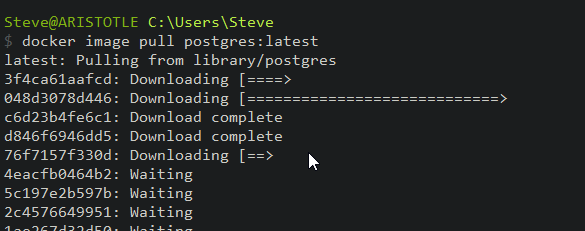
2022-12-26 13_16_43-cmd - docker image pull postgres_latest

Next, I need to run the container. I’ll do that with this command. This names my container pgdev and gives me a password to connect for the “postgres” user. I also will use a volume on my local drive.

docker run --name pgdev -e POSTGRES_PASSWORD=demo1234!@# -d -p 54320:5432 -v C:\Docker\postgresql-1-dev:/var/lib/postgresql/data postgres


Before I run this, I’m create folders on my local C: drive for the docker data to safe. This is the folder I’ll map in my containers.

2022-12-26 13_38_14-Documents

I’ll connect with Azure Data Studio (ADS) as I have the PostgreSQL extension. Once connected, I’ll query the information schema tables.
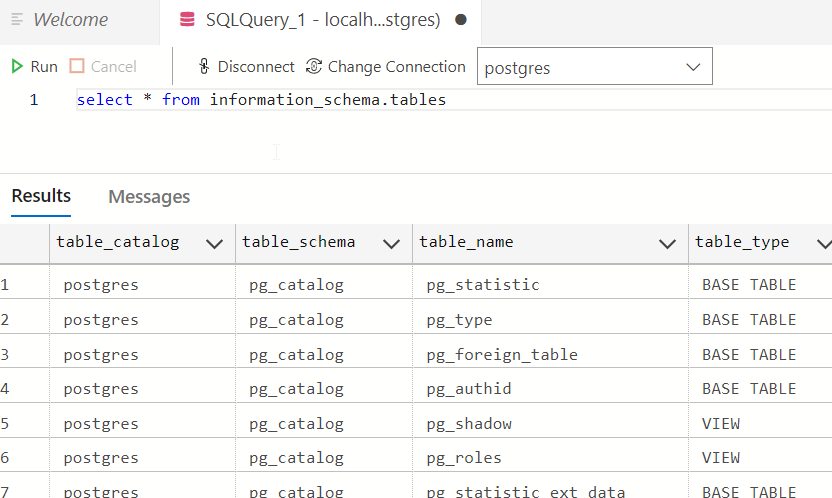
2022-12-26 16_14_55-● SQLQuery_1 - localhost.postgres (postgres) - DBAScripts - Azure Data Studio

This works. Now, let’s set up a dev environment similar to SQL Server. First, we create a database with the CREATE DATABASE command.

create database fwpoc_1_dev

Once I run that, I’ll select it in the ADS connection drop down. Now I run this to create a schema and table.

create schema poc;

create table poc.Demo ( DemoID int);

insert into poc.Demo (DemoID) values (1), (2)

select * from poc.demo


This works and gets me a development environment. I’ll start another container for qa and prod, but I won’t do that now. Instead, I’m just getting the base environments set up.

Summary

That’s it. This post was about getting an environment set up and ready for development on a PoC. This is the first step, and it’s already a lot.

Future posts will look at the Flyway and Flyway Desktop settings, a repository, and a MySQL set of environments.

Follow the entire series on my blog.

Posted in Blog | Tagged , , , | Comments Off on Starting the Flyway PoC–Environment

The Challenge of Deleting Data

We collect a lot of data in our databases. Not as much in bytes as a lot of the video/audio/TikTok/Instagram sites, but still enough that many of us are constantly adding storage to our systems. All this data is not only a challenge to manage, but it also means that we are regularly dealing with query tuning issues. Better code, indexes, and more become regular challenges with large volumes of data.

I am a big fan of trying to reduce the data you manage where possible. Archive, delete, remove older data, do something. This not only makes your systems easier to manage and improves performance, but it reduces your risk. Any PII data you have that might store is an ongoing risk in the event of a data breach. I don’t pretend this is easy to do in any way, but it’s a good idea.

If you can remove data (or must because of a regulation like the GDPR), how do you ensure that data is deleted? Most of us know how to submit a DELETE statement, but that just removes the data from an online system. What if you restored or recovered this database tomorrow, would you remember to delete the data again? What about losing a copy of the data or log backup? What about older dev/test systems that were refreshed from production? The data might be in there. If you work through the possible problems, deleting data from a system isn’t as simple as you might expect.

This might be even more complex in the age of cloud computing, where we don’t control the hardware for primary systems, or for backups. There is an article on deleting data in the cloud that talks about the government standards that require that you not only delete data, but that you overwrite the physical hardware to ensure it can’t be recovered. This still doesn’t address backup systems, but it does help to clarify that many of us might start to demand cloud vendors not only de-allocate the disks we use (or the backup storage), but they also overwrite the storage with zeros.

Data security and the risks of not taking this seriously is becoming a bigger issue all the time. I don’t know that poor security will cause your organization to fail, but there can be significant costs and possibly reduced employment opportunities. While you might not want to be overly paranoid or concerned about every possible issue, it is worth asking questions of vendors, working through likely scenarios, and trying to quantify risk.

More and more systems are regularly under attack from malicious groups, which means we want to minimize simple mistakes, reduce human error, and limit the exposure we have from the data we have by storing only the data we need.

Steve Jones

Listen to the podcast at Libsyn, Stitcher, Spotify, or iTunes.

Posted in Editorial | Tagged , , | Comments Off on The Challenge of Deleting Data

Daily Coping 23 Jan 2022

Today’s coping tip is to eat healthy today with some nourishing food.

A few days before think I was getting ready for my daughter to leave for university. I enjoy cooking for everyone, but I wanted to get her something special for dinner. I decided to take this ramen recipe and then add a few new twists.

I added:

  • baby corn
  • broccoli
  • chili garlic sauce on top

I removed:

  • sugar snap peas
  • avacado (no ripe ones).

It was a good, nice, healthy meal for everyone.

I started to add a daily coping tip to the SQL Server Central newsletter and to the Community Circle, which is helping me deal with the issues in the world. I’m adding my responses for each day here. All my coping tips are under this tag.

Posted in Blog | Tagged , , | Comments Off on Daily Coping 23 Jan 2022

Minimize Typing

It couldn’t have happened to a worse set of people, and I’m glad it did, but I’ll still take a positive lesson out of this. A hacker sent a typo in a command to a botnet and lost control. That’s kind of funny, and I’m glad it happened. The less botnets, the better, IMHO.

The coding in this software didn’t have good error handling, which is a lesson in and of itself. Overall it seems many developers do a good job of error handling, but I still encounter more pieces of software that allow problematic input than I’d like. While we don’t have great error handling in T-SQL, you can make some checks, and you should.

That’s not the big lesson for me. The bigger lesson is that we ought to do less typing in much of our daily work. The last decade has had me work often with companies looking to implement DevOps software pipelines and driving automation wherever possible. We want to limit the chances humans can make mistakes, which means we want to limit their typing. Or clicking, as is the case in much of today’s software.

Instead, we want to ensure all our code or commands are reviewed by someone, they are submitted to an automated pipeline, and they are validated or practiced on some system ahead of production execution. We ought to do this for no other reason than we want to ensure we have an audit trail, but preventing typos is good as well.

I don’t know if you can completely get away from typing, but we can reduce the number of human error mistakes if we include some static code analysis (including for commands), some peer review, some sort of unit testing, and pre-production deployment. A lot of mistakes I find are fairly simple ones. Common human error that occurs because we’re busy, we’re stressed, we’re moving too fast, or we just miss something.

Use the computer for one of its strengths. Tediously checking the simple things that humans do wrong.

Steve Jones

Listen to the podcast at Libsyn, Stitcher, Spotify, or iTunes.

Posted in Editorial | Tagged , , | Comments Off on Minimize Typing