Losing Track of Data

I saw this article a few months ago, which talks about engineers at Facebook not knowing where their customers’ personal data is stored. The engineers were being questioned in a legal matter, where they were asked to definitively state where all personal PII data for any human was stored by Facebook. Their answer was that they didn’t think anyone in the company would be able to answer that question.

Facebook has been controversial over the years, and plenty of people dislike the way the company conducts business. I noticed no shortage of data people (and many others) commenting on this situation, saying that Facebook should be shut down because they don’t know where data is being stored.

However, I don’t agree. In working with lots of customers, on all aspects of how they handle, process, and manage data, I expect this to be a problem in many organizations. Whether large or small, whether they have few or many software engineers, it is highly possible that there isn’t a good list of where personal data is being stored. As we work with customers to classify data with SQL Data Catalog, that process takes a long time, and very often the system administrators or developers who undertake take the task are unaware of all the places where data is stored.

That’s just in relational databases, ignoring all the Excel spreadsheets, text exports, mail merge operations, and uploads to services for mailing, analysis, or something else. Very often the control of personal data is fragmented among groups, with there being few efforts made to coherently manage a customer’s data.

The world has adopted computing at an incredibly fast pace, often by people with little knowledge or forethought of the implications of gathering and processing data. In many cases, probably most cases, there is no overriding strategy. Just like with applications slapped together quickly, we find data being gathered and stored based on the requirements and demands of business people, with no planning for management or archival, and often not even with any security requirements.

I liked the GDPR as a step forward, asking companies to not only handle data appropriately, but remove it when not needed, not use it without consent, and to be able to keep track and delete it if not necessary. I don’t know that this has been successful, but it has changed handling practices in some organizations. At least in responsible organizations, and many of them have had to track down personal data to delete it. I’m not sure they know where it all is, but I at least assume they know where all of the data about a person is in their various relational stores.

As a technical person, do you know where all data is stored about a customer? Are you sure you know where marketing has been keeping information and what other mailing, analysis, reporting, CRM, etc. systems they’ve put data? Any idea how many copies the operations group keeps? Test systems, QA, UAT, and others? What about test data sets, are they sanitized? Perhaps legal or finance has gotten extracts of data to reconcile their systems.

Tracking down all data can be hard, and I’m not surprised Facebook struggles. I would guess engineers in many organizations would have similar answers.

Steve Jones

Listen to the podcast at Libsyn, Stitcher, Spotify, or iTunes.
Posted in Editorial | Tagged , , | 8 Comments

Using SQL Data Compare from the Command Line with a Project

SQL Data Compare (SDC) is a great way to sync data among tables. It’s a software utility analogous to SQL Compare, but working with data rather than schema. I had a customer ask recently about setting up a SDC project and then calling that from the command line rather than using the GUI and clicking.

This post looks at how you can call a project from the command line. The project has a WHERE clause in it, so it uses the settings from the project.

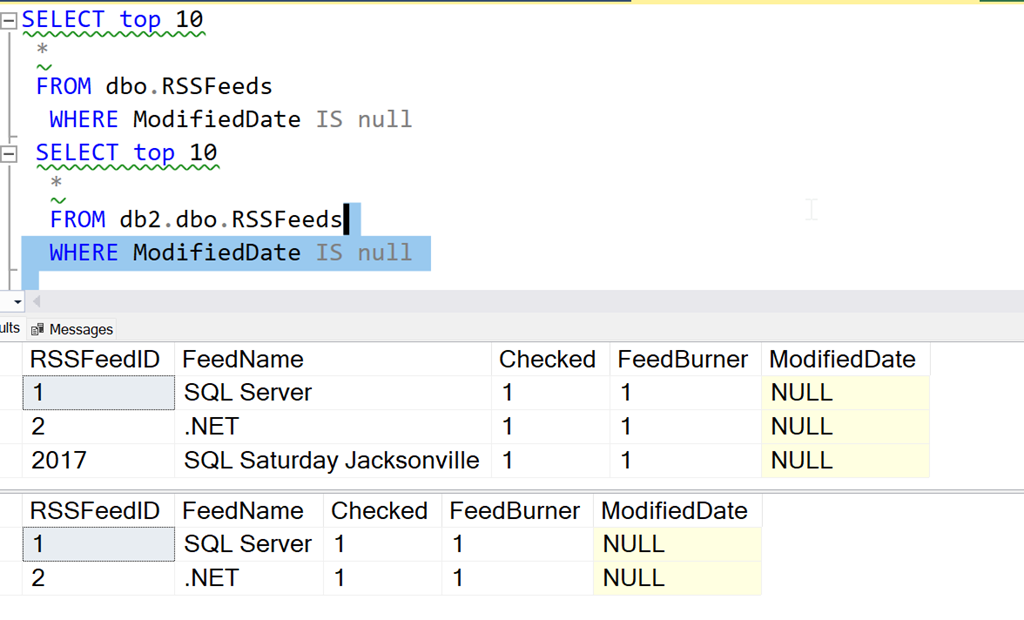
We have the data shown here, from two different databases. There is 1 row in the first table that is not in the second table (in the second database).

2023-01-11 10_12_23-SQLQuery3.sql - localhost.db1 (WAY0UTWESTHP_way0u (59))_ - Microsoft SQL Server

I’ll build a SQL Data Compare project. In this project, I point to these two databases and the tables.

2023-01-11 10_12_34-SQL Data Compare - C__Users_way0u_OneDrive_Documents_SQL Data Compare_SharedProj

If I edit the project, I can choose the tables and views tab. Here I see my tables, and I select the dbo.RSSFeeds table.

2023-01-11 10_24_46-DLM_Demo_RSS.sdc

When I select the row with dbo.RSSFeeds, I can then click the “Where clause” option and get a dialog where I can filter data. Here I can enter the where clause I used in the first query above. I also have the”use the same WHERE Clause” box checked.

2023-01-11 10_12_50-DLM_Demo_RSS.sdc_

Now I can save that project. I’ll then execute this from the command line. Note that I don’t have the SQL Data Compare install in my path, so I qualify both of these files, the executable and the project file. The call for me is:

"C:\Program Files (x86)\Red Gate\SQL Data Compare 14"\sqldatacompare /project:"C:\Users\way0u\OneDrive\Documents\SQL Data Compare\SharedProjects"\DLM_Demo_RSS.sdc

You can see this being run below:

2023-01-11 10_13_13-cmdI can see there is a single row in the DB! that needs to move to DB2, which is the result I saw in the first queries above and in the SQL Data Compare gui.

If I add the /synchronize option to this call, SQL Data Compare will deploy the changes. Once I do that, I can query the two tables and see the data is the same. At least the data matching the WHERE clause.

2023-01-11 10_13_41-SQLQuery3.sql - localhost.db1 (WAY0UTWESTHP_way0u (59))_ - Microsoft SQL Server

Some of this is documented, but not worked through in an example, so I wrote this post to help myself and anyone else looking to work with SQL Data Compare from the command line. This is a great way to sync data easily between systems, if you have a repeatable set of data that you need to move.

SQL Data Compare is a very handy tool for checking and moving data between tables that needs to be synched. All sorts of lookup or reference data can be managed with SQL Data Compare. If you haven’t tried it, grab an evaluation and give it a try.

Disclosure: I work as an advocate for Redgate Software.

Posted in Blog | Tagged , , | Comments Off on Using SQL Data Compare from the Command Line with a Project

Daily Coping 25 Jan 2023

Today’s coping tip is to be gentle with yourself when you make mistakes.

I forgot about a commitment. I had agreed to do a webinar and prepare some content. I got busy with life, almost forgot the webinar, and was scrambling to put together a couple of slides. I got something ready, but it didn’t look great, and I wasn’t happy with it.

Fortunately, I never needed the slides in the webinar.

I was upset with myself, and I spent a few minutes berating myself, as well as thinking “what could I do differently?” Should I set more reminders? Do I need a better to-do list? Should I let some personal things go to ensure I stay on task?

Ultimately I stopped that. I had planned for the webinar, it was on my calendar, and I had done some prep the week before. I got hung up this week with a few personal issues, and that is something I need to accept will happen. Things worked out, so I need to forgive this mistake.

I started to add a daily coping tip to the SQL Server Central newsletter and to the Community Circle, which is helping me deal with the issues in the world. I’m adding my responses for each day here. All my coping tips are under this tag.

Posted in Blog | Tagged , , | 4 Comments

Daily Coping 24 Jan 2023

Today’s coping tip is to get outside and notice five beautiful things.

I decided to do this on a snowy, stormy day in Denver. I was up early with my daughter running a couple errands, and I took a few minutes at different times to look around. Here’s what I noticed:

  1. My driveway markers stand out nicely and helped us get out of the driveway, which was covered under a blanket of snow.
  2. The snow is sticking nicely on the trees, making a wonderful winter wonderland.
  3. It was a bit of a blizzard, but walking between the car and a building, we were sheltered. Without wind, even in 25F weather, the air was brisk and refreshing.
  4. Snow is fun. Even without sticking together to make a snowball to throw at my kid, it’s a neat form of water.
  5. It was mostly cloudy, which made it hard to see, but a few times the sun started to shine through. Even mostly blocked by clouds, the bright ball made the entire landscape brighten up.

I started to add a daily coping tip to the SQL Server Central newsletter and to the Community Circle, which is helping me deal with the issues in the world. I’m adding my responses for each day here. All my coping tips are under this tag.

Posted in Blog | Tagged , , | Comments Off on Daily Coping 24 Jan 2023
