Daily Coping 4 Aug 2021

I started to add a daily coping tip to the SQLServerCentral newsletter and to the Community Circle, which is helping me deal with the issues in the world. I’m adding my responses for each day here. All my coping tips are under this tag. 

Today’s tip is to remember we all struggle at times as humans.

Empathy is a feeling that I suspect many people would like to have. Or maybe not. I know some people seem to have little and not want to give any to anyone outside their family. Or maybe even their family.

To me, I think it’s important to look at the world from other points of view, and consider how others feel. During this last year, a lot of my pandemic talks with people are remembering to counsel them to remember their view isn’t mine. Nor is it many others.

Today, what’s on my mind is Simon Biles. She withdrew from Olympic competition recently. This was a hot topic in the volleyball group I am a part of with other coaches. I was amazed by the very polar opposite reactions from people. Some empathized and applauded her for talking about mental health and the impact it has. Others castigated her severely for not competing no matter what.

Both are valid views, though I think one ignores empathy. It ignores that we are human and we can struggle. I don’t know what the best choice was, but I respect someone else’s ability to make that choice.

I had a kid quit during a match. The moment become too big for her and walked off the court, leaving the game, abandoning her teammates. At that moment, my first thought was concern for her. Actually, first thought was who goes in and how we manage the game, but as soon as I had a sub, I was concerned.

We coaches talked with her after, and know that difficult times in life are hard. They are difficult. There are reasons to stop, and in our mind, this wasn’t one. She wasn’t in physical harm, and she could have played a different role, or let us change her responsibilities ,but walking away wasn’t a good response. Ultimately, she had to apologize to everyone for what happened. We forgave her, moved on, and competed the next time.

In another situation, maybe walking off makes the most sense. There’s a balance between commitment and self-preservation, and I don’t think this case was the latter.

However, the point today in coping is to remember everyone else is coping. They are coping in different ways, and with a different world. They live a different life. I want to help, support, counsel, and even push them. They have responsibilities, and are accountable, but they are also human.

I have empathy for them, and try hard to understand the world from their view.
Posted in Blog | Tagged , , | Comments Off on Daily Coping 4 Aug 2021

Daily Coping 3 Aug 2021

I started to add a daily coping tip to the SQLServerCentral newsletter and to the Community Circle, which is helping me deal with the issues in the world. I’m adding my responses for each day here. All my coping tips are under this tag. 

Today’s tip is to reach out to a family member, friend, or colleague.

I did this recently for a trip. I actually took a business trip, the first one since 2019. Before I did so, I sent a few notes out to friends I know in the company, but I also reached out to a friend who lives in the LA area. I wanted to check on him, as it’s been months. I also was hoping he might be free for dinner.

He was, we got together, and it was wonderful.

Posted in Blog | Tagged , , | Comments Off on Daily Coping 3 Aug 2021

Interconnected Temp Files

The other day I went to cook dinner for the family. I had picked a new recipe (everyone loved it), and it was going to be a bit of prep. Before I started, I turned on the speaker in the kitchen, connected my phone, and started Spotify. I got 2 sec into the song, just enough for me to turn and reach for the cutting board when the music stopped. I turned back, started it and everything repeated.

I tried a few times, but it kept happening. I opened Spotify on the iPad we have in the kitchen, where the recipe was displayed and tried there. I had the same experience. At this point, I was getting annoyed and a little stressed. I needed to get cooking, but I also wanted some music. Maybe a little bit of OCD coming out as I checked my desktop with the same result. I updated the credit card and had my daughter check her app.

A little searching around had me try different things (rebooting, log out/in, etc.). Finally, I found one person that noted clearing the temp files on my desktop might help. I did that, deleting a few GB and cleaning out the UserData folder for Spotify. I restarted the app, and things worked. I walked back to the kitchen and the iPad, and music played there as well. Finally, I could get dinner started.

I’ve been enamored with some of the Spotify-connected features, allowing a few of us to listen together. I like when I listen in the car (or desktop) and then move to the other location, I can pick up where I left off. However, I hadn’t expected something like corrupt or data problems on my desktop to affect me on another device. As we start to interconnect more apps, it’s possible that a problem on one device might affect others.

We do interconnect some systems in the data world. We have clusters and Availability Groups, and we certainly sometimes have instances or databases that create dependencies  between two systems. I doubt that many of you have one instance cause a problem with another, but it’s worth keeping in mind. We want connected systems, but we don’t want failures in one place to cascade throughout all the nodes.

I like connected things, but I want loose coupling. I want one system to run on its own if the other has an issue, but I do want them to share data or status to improve the operation of the software. The big thing is that I don’t want one device (my desktop) to affect the operation of another (my phone). At least not while I’m cooking.

Steve Jones

Listen to the podcast at Libsyn, Stitcher, Spotify, or iTunes.

Posted in Editorial | Tagged | Comments Off on Interconnected Temp Files

The PowerBI Volleyball Report – Organizing Data To Start

One of my goals this year was to build a report that I can present to kids and parents showing the skills progression of their kids. I have attempted a few times to put something together in Excel, but it wasn’t easy for parents to visualize, and I wanted something better to let them focus on a specific kid, without making the data hard to consume. Power BI makes this easy.

This post looks at my data capture process, and how I evolved it a bit to make this easy to handle in Power BI.

Data Capture

I’ve tried a few ways to gather data during matches, but paper turns out to be the easiest way to ensure this happens quickly and fairly accurately. While there are a number of apps, I find them problematic as one wrong press means the data capture stops, and I can then miss the next item.

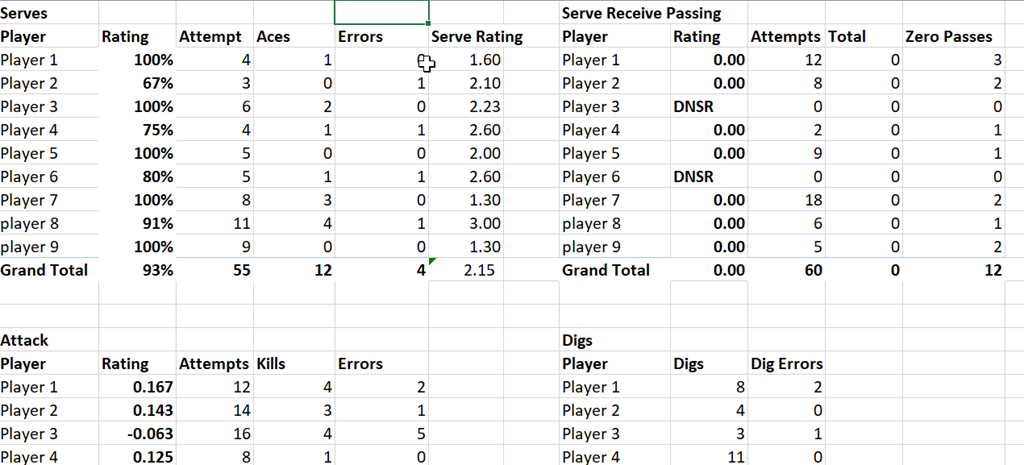
I used to calculate all totals by hand and then put them in a spreadsheet for parents after each competition, which worked well, but this format isn’t easy for Power BI to deal with.

2021-07-28 14_12_31-Stats2022_16Select.xlsx - Excel

Easy for humans, but bad for reporting.

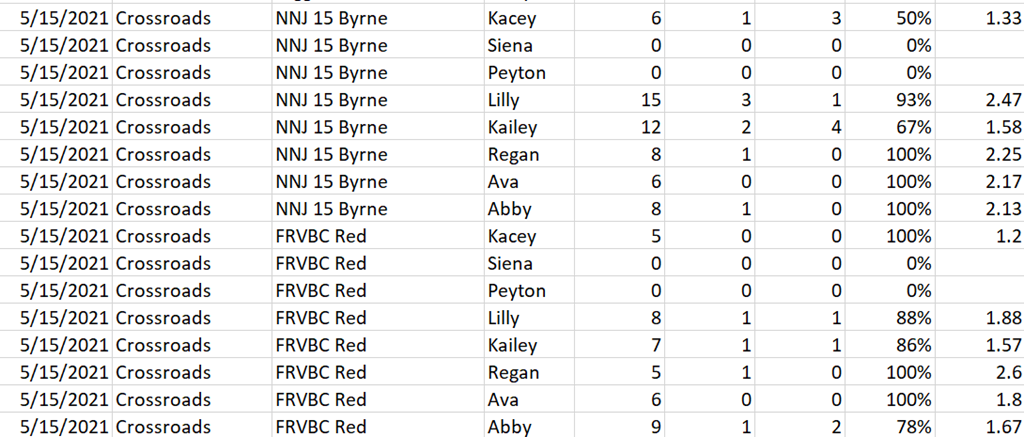
As a result, I stopped to think what would be good and easy for Power BI. A table is best, and while I don’t want to bother with a database, I can modify my Excel formula easily enough to handle this.

Since I will report on different areas, I decided to keep a master sheet for each report area. This means I have a “serve” worksheet, as well as others for Serve Receive, Attack, Digs, Blocks, and Assists. I can also add in new sheets as needed.

Making a tabular format means that I added a few columns to this list. These columns are the slicers that atheletes and parents might want to use when they are reporting. In my case, these are:

  • date of event
  • event name
  • opponent
  • player

With these columns, I can take my paper sheets, type in the raw data, and let Excel do a few calculations. This also means my main report is just a few sums from these raw sheets to get the totals above. From last season, I had data like this:

2021-07-28 14_19_37-Stats2021_15Select.xlsx - Excel

I also decided to enter data in the same order each time so that once I have a sum to copy data from this sheet for one player, I can copy/paste those formulas for the rest. This keeps the burden low for post game work.

This also means that when I “Get Data” in Power BI, I just load data from each worksheet into a separate table in Power BI. This allows separate reports that are simpler to produce, as much of this data doesn’t make sense when combined together. This also means that I don’t have one huge table where I’m trying to manage data and potentially scrolling around a lot from left to right. This also means I can load this into SQL Server easily if I want to.

This also means I need to set up incremental refresh in Power BI.

Posted in Uncategorized | Tagged , , | Comments Off on The PowerBI Volleyball Report – Organizing Data To Start