Learning Intentionally with a List

We’re coming up on the middle of the year, and I wonder if you are improving your career this year? Did you make plans and are you sticking to them? I’ve been tracking progress on my goals, and so far mediocre progress.

It’s tough to learn, but even tougher to learn when you don’t have a specific focus. Choosing to “get better at T-SQL” isn’t a good goal. It’s vague and hard to measure. To me, you need to pick some specific areas to focus on and then develop some goals on what you want to accomplish. For example, you might want to learn to work with APPLY and convert some queries from joins to APPLY or pick a series of challenging problems that you can solve with that operator.

Mental note: make some lists of problems to solve.

These days there are so many areas that you could focus on when working with data that it can be overwhelming to try and pick something. If you were to think about what you want to learn today, what’s the list of things you think you need to learn?

If you have that list, then can you choose a few specific things that will help you measure your progress? I’ve picked a few, but not enough to measure tightly. That’s something I need to change for next year, with some ways to measure myself better.

If you are working on growing your skills, share some ideas on how to improve your career and skills. What types of things help you get better? Maybe more important, what things do you think are important to learn and why?

Steve Jones

Listen to the podcast at Libsyn, Stitcher, Spotify, or iTunes.

Posted in Editorial | 1 Comment

Daily Coping 2 Jul 2021

I started to add a daily coping tip to the SQLServerCentral newsletter and to the Community Circle, which is helping me deal with the issues in the world. I’m adding my responses for each day here. All my coping tips are under this tag. 

Today’s tip is to share a happy memory with someone who means a lot to you.

I am lucky in life with quite a few people mean a lot to me. Today, I decided to touch base with someone whose company I’ve enjoyed quite a few times. This person is a fellow speaker who I’ve seen at quite a few events over the years. We’ve had both professional and social time through years and become friends.

In particular there was an event we attended where we went for an early morning walk before a busy day. I don’t remember what we talked about, but for some reason that walk stands out as a pleasant memory for me that I cherish.

Posted in Blog | Tagged , , | Comments Off on Daily Coping 2 Jul 2021

Daily Coping 1 Jul 2021

I started to add a daily coping tip to the SQLServerCentral newsletter and to the Community Circle, which is helping me deal with the issues in the world. I’m adding my responses for each day here. All my coping tips are under this tag. 

Today’s tip is to share a friendly smile when you encounter someone else today.

This has been something I’ve tried to do over the last year, but when wearing a mask, it’s tough to know if a smile is received.

When we stopped wearing masks in the gym (for vaccinated people), one of my yoga instructors noted that it was nice to see faces and smiles after so many months. I felt the same way.

Not everyone is in the same place, and even though we have people in my area not wearing masks, some are nervous, some struggling with the aftereffects of a year of the world changing, not working, etc.

As a result, smiles as still important. They help many of us continue to cope with the world.

I was in Florida recently for a sports event, and while many people were not masked, officials were (by requirement). Some were upset, some didn’t care, and often they pulled them down to talk with me when I was acting as the second official. However, I tried to smile a lot and welcome them when they came over.

I definitely ended up getting along with them better than some other coaches Winking smile

Posted in Blog | Tagged , , | Comments Off on Daily Coping 1 Jul 2021

Setup Full-Text using T-SQL–#SQLNewBlogger

Another post for me that is simple and hopefully serves as an example for people trying to get blogging as #SQLNewBloggers.

I wrote a previous post on how to set up full-text searching (FTS) and indexes in SSMS. This post looks at the T-SQL equivalent.

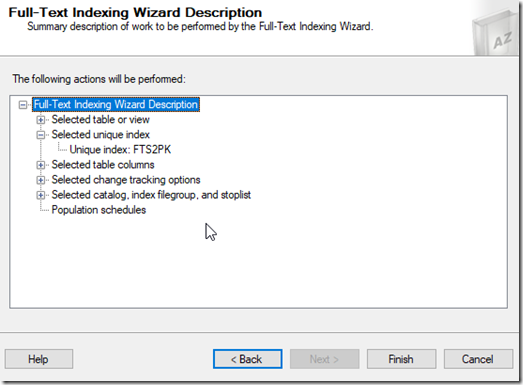
Everything in SSMS uses T-SQL under the covers. Often, you can get the code from a dialog in SSMS and use that for repeatable operations. For FTS, that’s not the case. When we get to the end of the wizard, there is no “Script” button.
2021-06-28 15_04_32-Full-Text Indexing Wizard

there isn’t one on other screens, either. This is an omission (and bug in) from SSMS, IMHO.

In any case, we need to do these things:

  • create a catalog
  • create a full text index
  • populate the index

That’s what we’ll do.

Create a Catalog

A FTS catalog is a logical group of FTS indexes. That’s it. This is used to be a way to decide where indexes are stored, as you can choose the filegroup for these. However, after SQL Server 2008, the storage decisions (path or filegroup) have no effect.

Now we really run this:

CREATE FULLTEXT CATALOG name

We can add accent sensitivity or a default setting (or an owner), but really we’re just picking a name here for the most part.I’ll run this:

CREATE FULLTEXT CATALOG FTSCat

That gives me a place to put indexes. I can create multiple catalogs, if needed.

Creating FTS Indexes

The next step is to actually create an index. The basic syntax uses the CREATE FULLTEXT INDEX DDL, with the table and column. We need a PK on the table for this to work, so make sure your table has one.

We can add some options for language, statistical semantics to be gathered, and population parameters. All of those are documented in the Docs. To create a basic index you can use, this is what I’ll do. First, here’s my table.

CREATE TABLE dbo.FTS2
(   myid INT NOT NULL CONSTRAINT FTS2PK PRIMARY KEY
   , Val  VARCHAR(2000));
GO

Next, let’s create the index. I want to index the val column in this table. I’ll use this statement:

CREATE FULLTEXT INDEX ON dbo.FTS2(Val) KEY INDEX FTS2PK ON FTSCat

This statement lists the table and the column(s) in parenthesis, much like any other index. I need to provide the unique index used to track rows, which in this case is the PK. I also give the catalog on which I store this index.

Once this is done, the index is created. This auto populates by default, which means I can query using the CONTAINS() function to search.

Populating Indexes

If I had specified manual population for the index, then I’d need to populate it myself. Plenty of people want to choose the time to populate indexes, as this can be resource intensive.

To do this, the ALTER INDEX can be used to start this. This is simple with the START FULL POPULATION (or UPDATE POPULATION) command.

ALTER FULLTEXT INDEX ON dbo.FTS2 START FULL POPULATION

That’s it.

Summary

This post essentially duplicates what I did in the previous post, but with direct T-SQL instead of using the GUI. It’s always good to know both ways to accomplish something, especially as the GUI might not contain an option you want to use.

SQLNewBlogger

This was easy to do after the previous post. I essentially repeated everything, except I had to look up the T-SQL for each step to check syntax.

This is a great example of showing some learning, and adding depth to a previous post. Easy to do, another item that can impress an interviewer.

Posted in Blog | Tagged , , | Comments Off on Setup Full-Text using T-SQL–#SQLNewBlogger