A Dedicated Space

Years ago I had a friend that was starting a consulting business. This person had worked for various organizations over the years and was ready to run a solo business. The city where this person resided was somewhat expensive, so they decided to convert a garden shed into an office space. They followed a similar process to this one, adding some interior finishing and electricity.

This individual struggled to work alone in this space, after years of working in offices. While it provided separation from children and other home distractions, it was hard to get used to working alone the majority of the time. Eventually the moved their office back into the house.

I was reminded of this when I saw a tweet from David Perell, noting that a good business model might be building recyclable, transportable offices. This pandemic has changed the way many people work, and while some have offices, I’ve had many of my colleagues working in bedrooms, dining rooms, and even in part of a kitchen area.

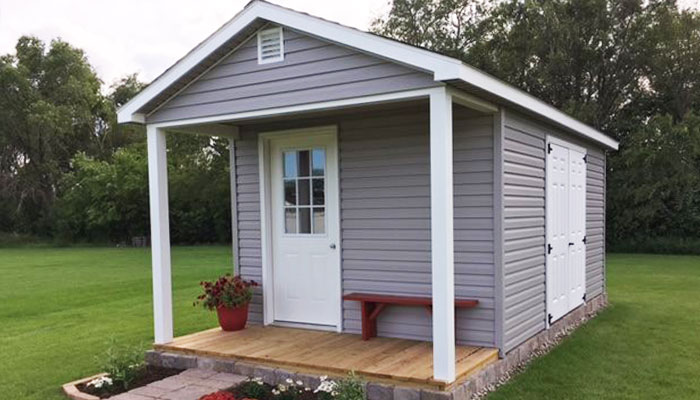
The way we work has changed for much of the technology world and plenty of us have adapted well. People that hated being stuck at home with distractions are growing used to the idea, though I suspect that not having a permanent space of your own is likely growing old. I wonder how many people would like a shed like structure in their yard or garden, with about 100sq ft/9sq m of personal room for your desk and whatever you need for your job. There are some really small, neat designs with lots of windows, porches, even fancy designs. Interiors can be simple or designed just for you.

Would any of you want to give up a little garden space to get a private office? With the changing world, and the chance that you might work at home for a long time, perhaps some of you would like a private space that’s just your own, perhaps even one that you could take with you if you moved to a new residence. Or maybe one that you can take to a shared space in a town. I could even see pods like this in an office park. Instead of a shared office space, maybe there would be outdoor pods near each other, where we can work near each other, but still in a safe, private way when we need to do so. Perhaps this is the next evolution of BYOD, as a Bring-Your-Own-Office.

Steve Jones

Posted in Editorial | Tagged | Comments Off on A Dedicated Space

Azure DevOps Changing Build Notifications

I don’t do a lot of team builds in Azure DevOps, but I constantly use it for demos. However, I’m often experimenting with things and I break builds regularly. I used to show the email notifications to audiences years ago, but I think Continuous Integration (CI) has become fairly common and people are used to getting notified on failures.

These days I find myself constantly getting success notifications, which are annoying. Instead, what I’d like to do is avoid these and only get build failures. This is a quick post of making this change.

I am doing this for a project, but you could do this for all projects. In my case, I’ll pick the project settings at the bottom of the main page.

2020-07-09 15_27_58-

This opens a list of items on the left, one of which is notifications.

2020-07-09 15_20_03-Settings · Notifications (SimpleTalk DB Demo - Basic) - Settings

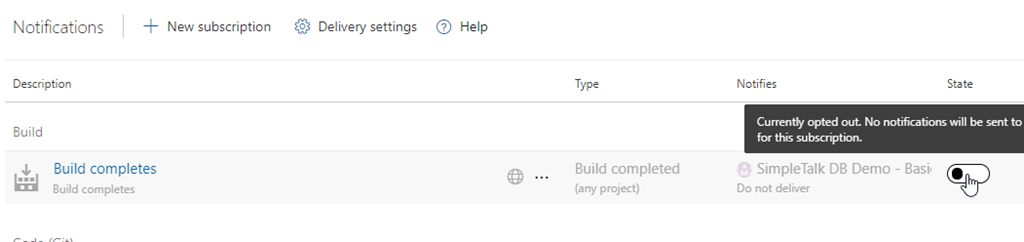
Select this and you see a number of default notifications set up. The top one is in the “Build” section and is for a build completing. We don’t need to know builds complete. In fact, I wouldn’t ever want this notification, even in a team. I assume most complete and only want failures.

This is enabled, but I’ve clicked the slider to disable this below.

2020-07-09 15_20_13-Settings · Notifications (SimpleTalk DB Demo - Basic) - Settings

Now I want a build failure notification. At the top there is a “New Subscription” area to select.

2020-07-09 15_22_42-Settings · Notifications (SimpleTalk DB Demo - Basic) - Settings

This opens a list of various subscriptions you can set up. The first item is build, and you can see on the right that I can choose the build complete or failure. I assume this is because I may want to alter the default settings for the completion.

2020-07-09 15_22_49-Settings · Notifications (SimpleTalk DB Demo - Basic) - Settings

I pick this and see some settings I can configure. I can change the name, decide who gets notified and even set this for all projects. I like these custom dialogs, letting me pick a number of criteria that I Can link in an and/or fashion.

2020-07-09 15_23_05-Settings · Notifications (SimpleTalk DB Demo - Basic) - Settings

That’s it. Now when I run builds, I don’t get notified if there is success. Only failure.

Posted in Blog | Tagged , , | Comments Off on Azure DevOps Changing Build Notifications

Daily Coping 20 Jul 2020

I’ve started to add a daily coping tip to the SQLServerCentral newsletter and to the Community Circle, which is helping me deal with the issues in the world. I’m adding my responses for each day here.

Today’s tip is to go for a walk to clear your head when you feel overwhelmed.

I’m lucky that I have space around my house to go walk without any COVID issues. That means that when I’m a bit stressed, I can go outside.

I’m not good at that.

I do try to take breaks and exercise, but often I go to the gym, practice yoga, or ride a bike. However, a walk is a good way to clear your head.

Last week I had a dog get surgery, and while she can’t walk this week, next week will be the time I do a bit of walking before, during, and after work.

Going outside, doing something easy and mindless often resets your brain, and might even inspire you to solve some problem that you are struggling with.

Posted in Blog | Tagged , , | 4 Comments

Digging Into Internals

Hugo Kornelis is a fellow Data Platform MVP and friend. He runs SQL Server Fast, and we recently put up an interesting page with this title: Debugging with debugger: investigating SQL Server’s internal structures. That’s a great title, and it is for a presentation that he is building and getting ready to present. I suspect it will be at a virtual conference soon, but we’ll see.

Hugo digs deep into the details of how things work. If you read his blog regularly, you’ll learn a lot about the ways in which SQL Server processes queries. You should learn how to better tune your own queries and produce efficient code. At least that’s the goal.

However, I wonder if most of you feel that way. While I see performance tuning sessions are often being the most popular topics at events, are you interested in internals? Do you actually use information from posts and presentations to dig in deeper to the way your queries are compiled and executed?

I know Plan Explorer is a very popular tool among MVPs, and lots of people download it, but I still see so many basic questions on execution plans, I sometimes wonder if people are really using the tool to change they way they write code.

If you want to learn more about query tuning, Hugo, Grant Fritchey, Aaron Bertrand, Paul White, Erik Darling, and many others will try to teach you. Just be sure you try and use the knowledge they impart in your daily work.

Steve Jones

Posted in Editorial | Tagged , | Comments Off on Digging Into Internals