Tag: Filetable

  • Two in Two Days

    It’s a busy week for me. I’ve got quite a few articles to review, feedback to write for Stairway Series authors, review and changes of some PowerPoint decks for later this month, and two User Group presentations.

    This is on top of a busy first week of school in the household. I feel like I’m playing catch up all week.

    Boulder

    I’ll be at the Boulder SQL Server User Group tonight. My presentation will be on Unstructured Data in SQL Server, looking at Filestream and Filetable and how they can be setup and used.

    Fortunately I’ve done this before, and a little practice this week was enough to get me ready.

    Hopefully I’ll see a few of you there as I haven’t been to Boulder in over a year.

    Denver SQL

    The Denver SQL Server User Group usually asks me do a presentation or two each year and this time I have a new one. They get to be my guinea pigs for the first delivery of this talk.

    Get Testing with tsqlt, a preview of a talk I’ll be doing at SQL in the City, is on the agenda. I’ve been going over this one a few times this week, so hopefully it goes smoothly.

  • FileTable– Using GetParent for Inserts

    In a previous post, I looked at the ways in which I could insert files into a Filetable folder programmatically. I used a NEWID() generation process, which mimics the constraint that is coded in the Filetable schema. However there was a comment asking if I could, or rather would, use the HierarchyID methods. It was on my list to investigate, so here it is.

    I have a file, actually an image, that looks like this:

    circle

    It’s a circle image, and the insert statement actually looks like this:

    INSERT  INTO dbo.Pictures
            ( name
            , file_stream
            )
    VALUES  ( 'circle.jpg'
            , 0xFFD8FFE000104A46494600010101006000600000FFE100684578696600004D4D002A000000080004011A0005000000010000003E011B0005000000010000004601280003000000010002000001310002000000120000004E00000000000000600000000100000060000000015061696E742E4E45542076332E352E313000FFDB0043000201010201010202020202020202030503030303030604040305070607070706070708090B0908080A0807070A0D0A0A0B0C0C0C0C07090E0F0D0C0E0B0C0C0CFFDB004301020202030303060303060C0807080C0C0C0C0C0C0C0C0C0C0C0C0C0C0C0C0C0C0C0C0C0C0C0C0C0C0C0C0C0C0C0C0C0C0C0C0C0C0C0C0C0C0C0C0C0C0C0C0C0CFFC0001108000A000D03012200021101031101FFC4001F0000010501010101010100000000000000000102030405060708090A0BFFC400B5100002010303020403050504040000017D01020300041105122131410613516107227114328191A1082342B1C11552D1F02433627282090A161718191A25262728292A3435363738393A434445464748494A535455565758595A636465666768696A737475767778797A838485868788898A92939495969798999AA2A3A4A5A6A7A8A9AAB2B3B4B5B6B7B8B9BAC2C3C4C5C6C7C8C9CAD2D3D4D5D6D7D8D9DAE1E2E3E4E5E6E7E8E9EAF1F2F3F4F5F6F7F8F9FAFFC4001F0100030101010101010101010000000000000102030405060708090A0BFFC400B51100020102040403040705040400010277000102031104052131061241510761711322328108144291A1B1C109233352F0156272D10A162434E125F11718191A262728292A35363738393A434445464748494A535455565758595A636465666768696A737475767778797A82838485868788898A92939495969798999AA2A3A4A5A6A7A8A9AAB2B3B4B5B6B7B8B9BAC2C3C4C5C6C7C8C9CAD2D3D4D5D6D7D8D9DAE2E3E4E5E6E7E8E9EAF2F3F4F5F6F7F8F9FAFFDA000C03010002110311003F00E97FE0E87FF82CA7ED35FB04FED85E09F03FC2BD6A5F87BE1097408B5C4D523D2ADAF1BC41746795248CBDC4722F970848C18940399373E43478FD75FF00827CFC68F177ED17FB0FFC2AF1D78F3461A078C7C59E19B2D4F57B110B42B14F244199846DF346AFC384392A1C024E335E95E2EF87BE1FF880968BAF687A3EB6B612F9F6C2FECA3B916F27F7D3783B5BDC60D6C5007FFFD9
            );

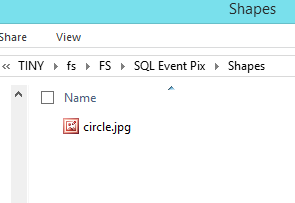
    That puts the file in my Filetable in the root. However suppose I actually wanted that in a folder. Here’s my Filetable share and you’ll note I have a folder called Shapes.

    filetable_zb

    Can I insert this file directly in there, using T-SQL? Let’s try.

    I wrote some code that would get the parent path and use that with GetDescendent(). However that didn’t work. I ran this:

    DECLARE @parent HIERARCHYID, @node HIERARCHYID
    SELECT @parent = path_locator 
     FROM dbo.Pictures
     WHERE name = 'Shapes';
    
    SELECT @node = max(path_locator)
     FROM dbo.Pictures
     WHERE path_locator.GetAncestor(1) = @parent
    
    SELECT @parent, @node;
    
    
    INSERT  INTO dbo.Pictures
            ( name
            , file_stream
            , path_locator
            )
    VALUES  ( 'circle.jpg'
            , 0xFFD8FFE000104A46494600010101006000600000FFE100684578696600004D4D002A000000080004011A0005000000010000003E011B0005000000010000004601280003000000010002000001310002000000120000004E00000000000000600000000100000060000000015061696E742E4E45542076332E352E313000FFDB0043000201010201010202020202020202030503030303030604040305070607070706070708090B0908080A0807070A0D0A0A0B0C0C0C0C07090E0F0D0C0E0B0C0C0CFFDB004301020202030303060303060C0807080C0C0C0C0C0C0C0C0C0C0C0C0C0C0C0C0C0C0C0C0C0C0C0C0C0C0C0C0C0C0C0C0C0C0C0C0C0C0C0C0C0C0C0C0C0C0C0C0C0CFFC0001108000A000D03012200021101031101FFC4001F0000010501010101010100000000000000000102030405060708090A0BFFC400B5100002010303020403050504040000017D01020300041105122131410613516107227114328191A1082342B1C11552D1F02433627282090A161718191A25262728292A3435363738393A434445464748494A535455565758595A636465666768696A737475767778797A838485868788898A92939495969798999AA2A3A4A5A6A7A8A9AAB2B3B4B5B6B7B8B9BAC2C3C4C5C6C7C8C9CAD2D3D4D5D6D7D8D9DAE1E2E3E4E5E6E7E8E9EAF1F2F3F4F5F6F7F8F9FAFFC4001F0100030101010101010101010000000000000102030405060708090A0BFFC400B51100020102040403040705040400010277000102031104052131061241510761711322328108144291A1B1C109233352F0156272D10A162434E125F11718191A262728292A35363738393A434445464748494A535455565758595A636465666768696A737475767778797A82838485868788898A92939495969798999AA2A3A4A5A6A7A8A9AAB2B3B4B5B6B7B8B9BAC2C3C4C5C6C7C8C9CAD2D3D4D5D6D7D8D9DAE2E3E4E5E6E7E8E9EAF2F3F4F5F6F7F8F9FAFFDA000C03010002110311003F00E97FE0E87FF82CA7ED35FB04FED85E09F03FC2BD6A5F87BE1097408B5C4D523D2ADAF1BC41746795248CBDC4722F970848C18940399373E43478FD75FF00827CFC68F177ED17FB0FFC2AF1D78F3461A078C7C59E19B2D4F57B110B42B14F244199846DF346AFC384392A1C024E335E95E2EF87BE1FF880968BAF687A3EB6B612F9F6C2FECA3B916F27F7D3783B5BDC60D6C5007FFFD9
            , @parent.GetDescendent(@node,NULL)
            );

    and got this:

    Msg 6506, Level 16, State 10, Line 20

    Could not find method ‘GetDescendent’ for type ‘Microsoft.SqlServer.Types.SqlHierarchyId’ in assembly ‘Microsoft.SqlServer.Types’

    I found a note on StackOverflow that the implementation of the hierarchyID in a Filetable isn’t the same as elsewhere. I’m not sure if that’s the case, but I haven’t been able to document it.

    However I decided to then try the method proposed as a comment in my last post. Insert, and then move.

    DECLARE @id TABLE ( id UNIQUEIDENTIFIER )
    DECLARE @streamid UNIQUEIDENTIFIER
      , @parentpath HIERARCHYID
      , @folder VARCHAR(1000);
    
    SELECT  @folder = 'Shapes';
    
    INSERT  INTO dbo.Pictures
            ( name
            , file_stream
            )
    OUTPUT  inserted.stream_id
            INTO @id
    VALUES  ( 'circle.jpg'
            , 0xFFD8FFE000104A46494600010101006000600000FFE100684578696600004D4D002A000000080004011A0005000000010000003E011B0005000000010000004601280003000000010002000001310002000000120000004E00000000000000600000000100000060000000015061696E742E4E45542076332E352E313000FFDB0043000201010201010202020202020202030503030303030604040305070607070706070708090B0908080A0807070A0D0A0A0B0C0C0C0C07090E0F0D0C0E0B0C0C0CFFDB004301020202030303060303060C0807080C0C0C0C0C0C0C0C0C0C0C0C0C0C0C0C0C0C0C0C0C0C0C0C0C0C0C0C0C0C0C0C0C0C0C0C0C0C0C0C0C0C0C0C0C0C0C0C0C0CFFC0001108000A000D03012200021101031101FFC4001F0000010501010101010100000000000000000102030405060708090A0BFFC400B5100002010303020403050504040000017D01020300041105122131410613516107227114328191A1082342B1C11552D1F02433627282090A161718191A25262728292A3435363738393A434445464748494A535455565758595A636465666768696A737475767778797A838485868788898A92939495969798999AA2A3A4A5A6A7A8A9AAB2B3B4B5B6B7B8B9BAC2C3C4C5C6C7C8C9CAD2D3D4D5D6D7D8D9DAE1E2E3E4E5E6E7E8E9EAF1F2F3F4F5F6F7F8F9FAFFC4001F0100030101010101010101010000000000000102030405060708090A0BFFC400B51100020102040403040705040400010277000102031104052131061241510761711322328108144291A1B1C109233352F0156272D10A162434E125F11718191A262728292A35363738393A434445464748494A535455565758595A636465666768696A737475767778797A82838485868788898A92939495969798999AA2A3A4A5A6A7A8A9AAB2B3B4B5B6B7B8B9BAC2C3C4C5C6C7C8C9CAD2D3D4D5D6D7D8D9DAE2E3E4E5E6E7E8E9EAF2F3F4F5F6F7F8F9FAFFDA000C03010002110311003F00E97FE0E87FF82CA7ED35FB04FED85E09F03FC2BD6A5F87BE1097408B5C4D523D2ADAF1BC41746795248CBDC4722F970848C18940399373E43478FD75FF00827CFC68F177ED17FB0FFC2AF1D78F3461A078C7C59E19B2D4F57B110B42B14F244199846DF346AFC384392A1C024E335E95E2EF87BE1FF880968BAF687A3EB6B612F9F6C2FECA3B916F27F7D3783B5BDC60D6C5007FFFD9
            );
    
    SELECT  @streamID = id
    FROM    @id
    SELECT  @parentpath = path_locator
    FROM    dbo.Pictures
    WHERE   name = @folder
    
    UPDATE  dbo.Pictures
    SET     path_locator = path_locator.GetReparentedValue(hierarchyid::GetRoot(),
                                                           @ParentPath)
    WHERE   stream_id = @StreamId


    In this code, I insert the file, but save the PK, the streamID using the OUTPUT clause. From there, I get the path of the folder, and then I use the GetReparentedValue function to move the file to the folder.

    That works fine, and I look in my folder after running this and see the file.

    filetable_zc

    I’m not sure what the difference with the hierarchyIDs is with a Filetable, or why operations on Filetable structures cause errors with some functions, but this seems to work and is likely a better way to handle any of your T-SQL manipulations with Filetable data.

  • Filetable–Nesting folders and files

    In previous posts I showed how to create a folder in a Filetable and also how to the create (and move) files into the subfolder. However I didn’t repeat that and wanted to test the ability to actually nest things further. With that in mind, I’m going to take this to the next step.

    The Scenario

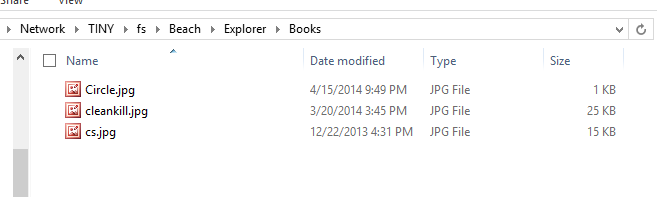
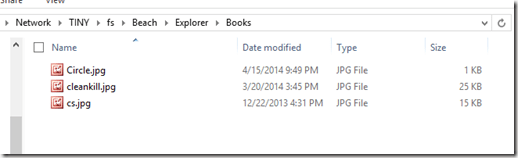
    What I’ve got is a subfolder in my Filetable called Books. This is the first level below the root of my Filetable share. This folder has three files in it.
    filetable_j

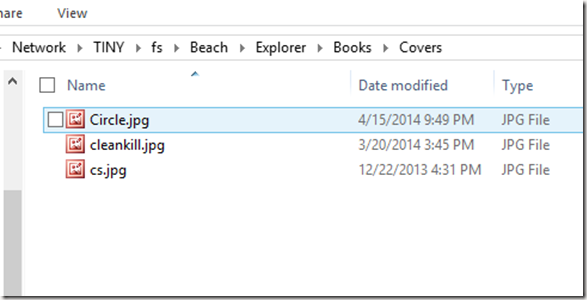
    One of these is the image of a circle, and the other two are images of book covers. I’d like to create a folder called “Covers” and then move the two jpgs into that folder together. Let’s see how this goes.

    The Solution

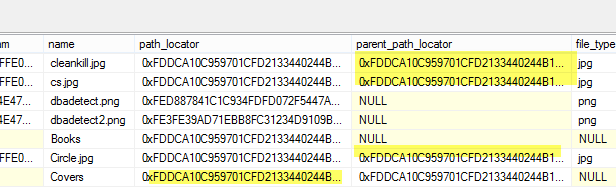
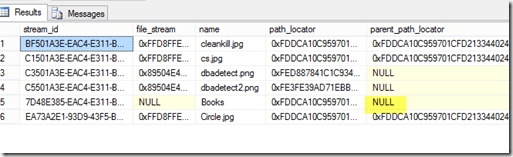
    The first set of code I want to run will create a folder, but it will have to be nested under the Books folder. As we can see from the table, the Books folder already exists and needs to be the parent_path_locator for my new folder.
    filetable_k

    The highlight shows that “Books” is in the root of my Filetable.

    Here’s the code, which calculates the new path_locator using the path_locator of “Books” as a base and then inserts a new folder.

    DECLARE @path HIERARCHYID
    DECLARE @new_path VARCHAR(675)
     
    SELECT  @path = path_locator
    FROM    dbo.Explorer
    WHERE   name = 'Books'
    
    SELECT  @new_path = @path.ToString()
            + CONVERT(VARCHAR(20), CONVERT(BIGINT, SUBSTRING(CONVERT(BINARY(16), NEWID()),
                                                             1, 6))) + '.'
            + CONVERT(VARCHAR(20), CONVERT(BIGINT, SUBSTRING(CONVERT(BINARY(16), NEWID()),
                                                             7, 6))) + '.'
            + CONVERT(VARCHAR(20), CONVERT(BIGINT, SUBSTRING(CONVERT(BINARY(16), NEWID()),
                                                             13, 4))) + '/'
    ;
    
    
    INSERT  INTO dbo.Explorer
            ( name, path_locator ,is_directory )
    VALUES  ( 'Covers', @new_path, 1 );

    .csharpcode, .csharpcode pre
    {
    font-size: small;
    color: black;
    font-family: consolas, “Courier New”, courier, monospace;
    background-color: #ffffff;
    /*white-space: pre;*/
    }
    .csharpcode pre { margin: 0em; }
    .csharpcode .rem { color: #008000; }
    .csharpcode .kwrd { color: #0000ff; }
    .csharpcode .str { color: #006080; }
    .csharpcode .op { color: #0000c0; }
    .csharpcode .preproc { color: #cc6633; }
    .csharpcode .asp { background-color: #ffff00; }
    .csharpcode .html { color: #800000; }
    .csharpcode .attr { color: #ff0000; }
    .csharpcode .alt
    {
    background-color: #f4f4f4;
    width: 100%;
    margin: 0em;
    }
    .csharpcode .lnum { color: #606060; }Once that’s run, I see this in the table:
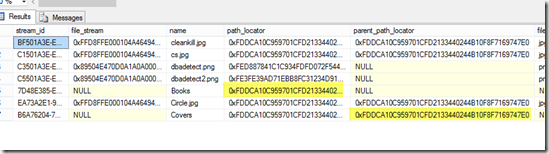
    filetable_l

    The two highlights are the same values, with the parent of the Covers folder matching the path of the Books folder. In the Books folder we see:
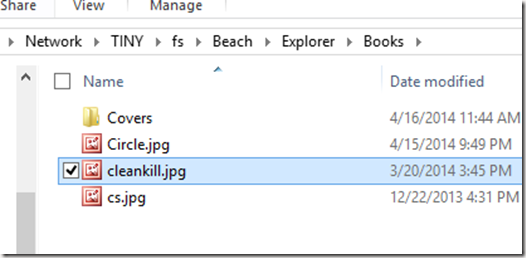
    filetable_m

    Things look good so far. I can programmatically nest folders. Now I need to move the two jpgs into the proper folder. Let’s do that in one (hopefully) statement.

    We use the same code as we did to move a file, but this time instead of a variable for the new path, we embed this in the update statement. In this case I actually moved all three files.

    DECLARE @path HIERARCHYID
     
    SELECT  @path = path_locator
    FROM    dbo.Explorer
    WHERE   name = 'Covers'
    
    Update dbo.Explorer
          SET path_locator = @path.ToString()
            + CONVERT(VARCHAR(20), CONVERT(BIGINT, SUBSTRING(CONVERT(BINARY(16), NEWID()),
                                                             1, 6))) + '.'
            + CONVERT(VARCHAR(20), CONVERT(BIGINT, SUBSTRING(CONVERT(BINARY(16), NEWID()),
                                                             7, 6))) + '.'
            + CONVERT(VARCHAR(20), CONVERT(BIGINT, SUBSTRING(CONVERT(BINARY(16), NEWID()),
                                                             13, 4))) + '/'
    
          WHERE RIGHT(name, 3) = 'jpg'

    .csharpcode, .csharpcode pre
    {
    font-size: small;
    color: black;
    font-family: consolas, “Courier New”, courier, monospace;
    background-color: #ffffff;
    /*white-space: pre;*/
    }
    .csharpcode pre { margin: 0em; }
    .csharpcode .rem { color: #008000; }
    .csharpcode .kwrd { color: #0000ff; }
    .csharpcode .str { color: #006080; }
    .csharpcode .op { color: #0000c0; }
    .csharpcode .preproc { color: #cc6633; }
    .csharpcode .asp { background-color: #ffff00; }
    .csharpcode .html { color: #800000; }
    .csharpcode .attr { color: #ff0000; }
    .csharpcode .alt
    {
    background-color: #f4f4f4;
    width: 100%;
    margin: 0em;
    }
    .csharpcode .lnum { color: #606060; }The table now shows:
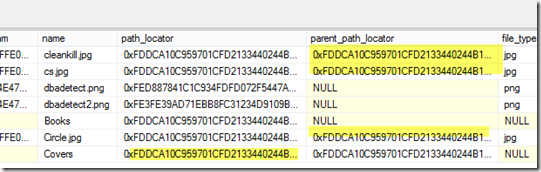
    filetable_n

    The shaded values, while very long now and truncated in the image, are in fact the same.

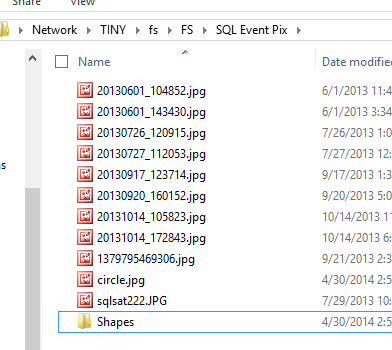
    The share shows:

    filetable_o

    and

    filetable_p

    I could certainly have accomplished this in other ways, but being able to do this in T-SQL is a nice way of managing your files in a simple way that might be easier than changing an application. It’s certainly a good way to fix incorrect data if the application can’t do it and this can be much faster than having a user move lots of files manually.

  • Filetable–Moving files programmatically

    I’ve been playing with Filetable and I was asked an interesting question. Can I move files to a folder programmatically?

    It’s trivial to do this in Explorer. Just drag and drop, and I’d expect that most people using Filetable from the client side would do this. I’d even expect that lots of programmers might use Powershell and the

    However suppose I loaded a bunch of documents into the Filetable folder and I needed to move or process them. I certainly could handle this easily from the client, but it’s actually simpler to do this from T-SQL.

    The Example

    Let’s say I have a few files in the root of my Filetable as shown in this image. My Filetable is the Explorer table inside this path.

    filetable_c

    If I check this from T-SQL, I see four rows I my table. Two jpgs and two pngs. The jpgs are books and I want to move them into a separate folder.

    filetable_a

    I decide to set up a folder inside of this structure. I can do that, using the technique from another post to create a folder from T-SQL. I create the “Books” folder and now If I look at how this appears in the table, it’s like this:

    filetable_b

    In the share it looks like this:

    filetable_d

    What I want is to now set the parent_path_locator of the jpgs to be that of the Books folder. However I can’t update that field as it’s a computed column. However I can update the path_locator of the two rows and compute a new HierarchyID value that includes the path_locator of the Books folder.

    The way to do this is similar to how I would add a file to a folder. I use this code to computer the new HierarchyID and update the existing rows.

    DECLARE @path HIERARCHYID
    DECLARE @new_path VARCHAR(675)
     
    SELECT  @path = path_locator
    FROM    dbo.Explorer
    WHERE   name = 'Books'
    
    SELECT  @new_path = @path.ToString()
            + CONVERT(VARCHAR(20), CONVERT(BIGINT, SUBSTRING(CONVERT(BINARY(16), NEWID()),
                                                             1, 6))) + '.'
            + CONVERT(VARCHAR(20), CONVERT(BIGINT, SUBSTRING(CONVERT(BINARY(16), NEWID()),
                                                             7, 6))) + '.'
            + CONVERT(VARCHAR(20), CONVERT(BIGINT, SUBSTRING(CONVERT(BINARY(16), NEWID()),
                                                             13, 4))) + '/'
     
    Update dbo.Explorer
          SET path_locator = @new_path
          WHERE name = 'Cleankill.jpg'

    Once this is done I see the share looking like this:

    filetable_f

    Here’s the root of the share, and you can see my file has been moved.

    filetable_e

    I repeat this for the other file, though I could potentially have wrapped this all up into one statement. This easily moves my files to the subdirectory in my Filetable.