Tag: R Language

  • Should You Learn R or Python?

    I’ve been working on various skills over the last few years, trying to solve some simple problems in Python and PowerShell, in addition to T-SQL, to continue to improve my skills. It’s an interesting challenge at times, especially when I need to use new features or functions to which I haven’t had exposure in the past.

    I also work with R lightly, as I need to build some Questions of the Day for SQLServerCentral and I try to alternate Python and R questions every week. This has caused me to dig in and try to learn more about the language and how to manipulate data.

    Recently I was reading an essay from a consultant that works with clients using both R and Python. The piece talks about the differences and how these work to solve business problems. If you don’t want to read the entire thing, the comparison starts with the simple “you need both”, though there is more to the story.

    The most interesting part of this for me was that the author notes that while these are good languages in different ways for data analysis, they aren’t great for data preparation and SQL is still required. Either a database like SQL Server or a platform like Apache Spark. Part of the reason is that R and Python aren’t very efficient, and as we work with more data and larger workloads, efficiency matters.

    The other part of the piece I liked was the note that we need to collaborate and our work needs to be reproducible for others. I love having git for moving code around and keeping configuration files in a repository of some sort. It has certainly helped me take advantage of bits that others have written and easily reproduce their work on my system.

    While some of us work with just SQL, I expect that we will get involved with other parts of projects and may need to help troubleshoot or improve code. I find both of these languages interesting and a nice complement to each other. I’ve also learned there are places where I much prefer one over the other, especially with some of the Advent of Code problems. Some are simple in SQL, but others are much more suited to Python. I haven’t tried them in R, but I bet some of them would be well suited to that environment.

    If you have tried either, or have a preference, let us know. What are the advantages or disadvantages of each when you are working in a business?

    Steve Jones

    Listen to the podcast at Libsyn, Stitcher, Spotify, or iTunes.
  • Reading an dataset in R

    I got a dataset file the other day with an .rds extension. I had never seen this, but with a quick Google, I figured out this was a dataset exported from r. The extension is for “R DataSet”.

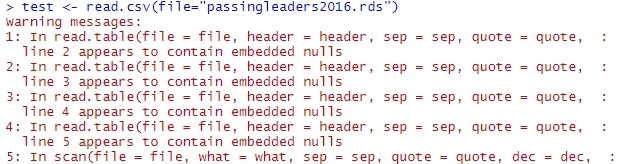
    That’s interesting, but how do I get this data into my workspace? Does readcsv just work on this? It doesn’t, as you can see here:

    2020-05-29 15_36_04-RStudio

    The format used is different, and there is a separate function to get this data. I searched and found this link, which describes loading data in the two different ways. Looks easy, so let’s try it. I’ll use the readRDS function in code like this:

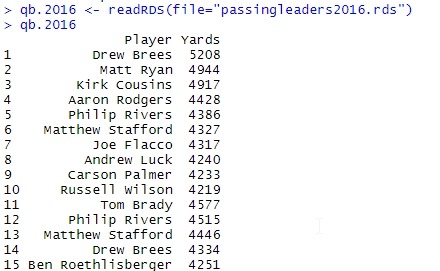
    > qb.2016 <- readRDS(file="passingleaders2016.rds")

    This works well, as we can see below. I get my data loaded in.

    2020-05-29 15_36_53-RStudio

    The first link above recommends this for working in R, but I often am going from a database or other system to R, so I think I’ll mostly stick with CSV. It’s good to know how to load them, if I do need to work with these files.

  • Basic User Functions in R

    As I’ve been learning more about the data platform, I’ve been exposed to some R language code. This makes sense, as more comprehensive data analysis needs something other than SQL. Or at least, some people think that and it behooves me to better understand what they do with R. I’ve also had to build questions for SQLServerCentral, so I’ve spent time working through different R language items.

    One of those items is the function. I first found this strange, but the more I think about it, the more I like this. Rather than some code that is a “create function double”, I actually assign a variable, which is really just some token in memory, to the function. I could do this as:

    double <- function(x) { x * 2 }

    This means the variable double contains a function, and I can call this as I would any function.

    i <- double(4)

    At this point, i would have the value 8.

    Simple and easy, but powerful. This can get more complex, and I’ll experiment more in future posts.

  • Finding the Titles in R

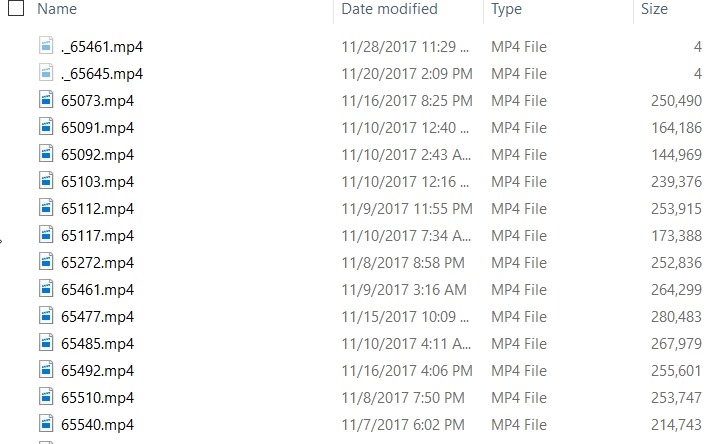
    PASS has released the videos to members from this past Summit. I say TJay Belt today ask about relating a video name to a session. I have the USB drive, so I looked on there. Here are the videos:

    2018-01-10 13_25_47-Video

    Not terribly helpful. If you run the HTML file from the stick, you see this:

    2018-01-10 13_26_23-PASS Summit 2017

    If I hover over a title, I see the link as a specific video file. For example, the first one is 65545.mp4. With that, I looked around and found a javascript file with information in it.

    The structure was like this:

    //SID
    Col0[0] = "65073";
    Col0[1] = "65091";
    
    …
    
    //Speaker Name
    Col2[0] = "Steve Stedman";
    Col2[1] = "Kellyn Pot'Vin-Gorman";
    
    …
    
    //Session Name
    Col4[0] = "Your Backup and Recovery Strategy";
    Col4[1] = "DevOps Tool Combinations for Winning Agility";

    All the data is in one file, but the index in each array matches. So Col0[0] is the SID for video 65073, which has Col2[0] as the speaker and col4[0] as the title.

    Now I want to get these in some sort of order. First, let me copy this data into separate files. That will make importing easier. I’ll copy the SID array into one file, the speaker array into a second file and the title array into a third.

    This gives me data like the list above, but I need to clean that. This is easiest in Sublime, with a few replacements. I did

    • “COL[“ –> “”
    • “] = “ –> “,”
    • “;” –> “”

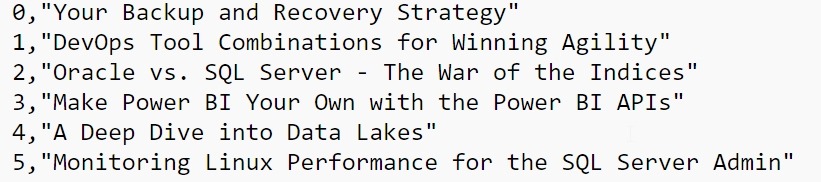
    This gives me a clean file that looks like this:

    2018-01-10 13_29_18-e__Documents_R_titles.txt - Sublime Text

    Working in R

    I almost started to move this into T-SQL and a table, but since I’ve been playing with R, I decided to see what I could do there. First, I know I need to load data, so I the first file into a data frame.

    session.index = read.csv("e:\\Documents\\R\\videosid.txt", sep=",")

    The column names aren’t great, so we’ll fix those:

     colnames(session.index) <- c("Index", "SessionSID")

    Now
    let’s get the other data.

    session.speaker = read.csv("e:\\Documents\\R\\passspeaker.txt", sep=",")
    > session.title = read.csv("e:\\Documents\\R\\titles.txt", sep=",") 
    > colnames(session.speaker) <- c("Index", "Speaker")
    > colnames(session.title) <- c("Index", "Title")
    

    I have three data frames. I want to combine them. Let’s do that. I’ll use the merge() function to do this. Since I’ve got common column names, I’ll use those.

    > pass.videos <- merge(session.index, session.title, by="Index")
    
    > pass.videos <- merge(pass.videos, session.speaker, by="Index")

    This gives me a data frame with the index, title, and speaker. Now I’ve got the data merged, let’s produce a file..

     write.table(pass.videos, file="e:\\Documents\\R\\passvideos.txt",sep=",")

    With that done, I can see I have a list of video numbers, titles, and speakers.

    "Index","SessionSID","Session","Speaker"
     "1",1,65091,"DevOps Tool Combinations for Winning Agility","Kellyn Pot'Vin-Gorman"
     "2",2,65092,"Oracle vs. SQL Server - The War of the Indices","Kellyn Pot'Vin-Gorman"
     "3",3,65112,"Make Power BI Your Own with the Power BI APIs","Steve Wake"

    I did something in R. Smile