Tag: replication

  • Replication Gets Some Love

    I really like replication in SQL Server. At least, I like it as a concept. It solves some hard problems and lets me move data around in a way that can handle larger loads, reduce queries to OLTP servers, and more. I’ve been hoping Microsoft would see this feature as critical to the future success of SQL Server and enhance it’s tooling, reliability, and feature set. Each time a new version is completed, I’m hoping that the Release Notes include a lot of replication changes.

    I’m usually disappointed, but not always. Recently I was excited by a change in a CU, not a new version. The SQL Server team added the ability to put the distribution database in an Availability Group. This is incredibly useful and helpful for ensuring HADR for replication scenarios. Prior to this, you could put the publication database in an AG, but not the distribution database. This is being added in CU6 for SQL Server 2017 and will be back ported to SQL Server 2016 in a future CU.

    There are plenty of restrictions in this first version of the feature, including the fact that local distributors aren’t supported. In fact, with all of the ways you can’t use this, I bet many replication environments can’t implement this.

    Yet.

    I have hope that future CUs will enhance this feature to remove restrictions and allow more flexibility with replication in AGs. I think that handling naming and networking issues in HADR situations is incredibly complex and replication was built quite some time ago, when we didn’t think so deeply about distributed systems. I slowly see Microsoft adapting parts of SQL Server to the modern world, and I hope that they continue to do so for replication.

    Steve Jones

    The Voice of the DBA Podcast

    Listen to the MP3 Audio ( 2.6MB) podcast or subscribe to the feed at iTunes and Libsyn.

  • Replication Silliness

    I wrote an editorial asking about things that needed to be done to improve replication. There are plenty of things that need help, but as I was testing some replication, I got this the other day.

    2017-06-20 10_35_01-Socrates - VMware Workstation

    I am trying to setup a secure home network (other than the same password for a few services to make life easier). I have firewalls running and open specific ports for SQL Server. In this case, I have multiple instances on this machine, so I opened a port for a named instance. I didn’t want the SQL Browser running, and connected with the port.

    These are all valid connections for the server:

    • Atlas,51433
    • Atlas\SQL2016,51433
    • Atlas.home.xxx.net,51433
    • Atlas\SQL2016
    • 192.168.1.201, 51433
    • 192.168.1.201\SQL2016, 51433

    Guess which ones work? Only the name/instance.

    Perhaps I’m doing something wrong, or there’s a setting, but this is a bit silly that valid connection strings with ports don’t seem to work with replication.

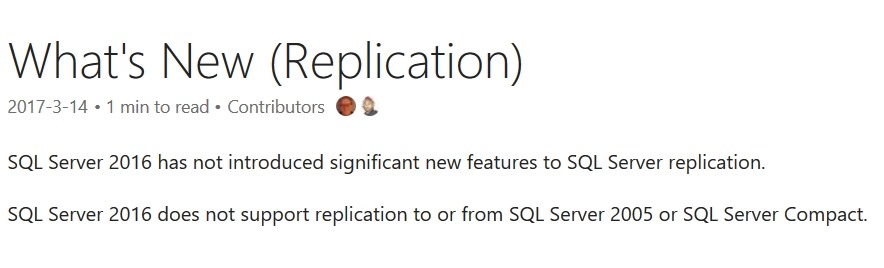
    Especially after seeing this:

    2017-06-20 11_20_43-What's New (Replication) _ Microsoft Docs

  • Improving Replication

    I really like replication as a technology. I think the ability to move data around to other systems, at a gross level, is extremely handy in many systems. While SSIS and other ETL tools are very flexible and powerful, they also require quite a bit of work to maintain. Being able to send a table (or a vertical/horizontal partition) to another system is just valuable.

    This is why I’m constantly disappointed that SQL Server hasn’t really bolstered their replication technologies to make it more robust.  Don’t get me wrong, there have been improvements in various versions, and replication has come a long way since SQL Server 6.5, but as an overall subsystem in SQL Server, it has a long way to go. The tooling needs work, the reliability and robustness needs work. I find replication brittle, as do many others, and when there are code deployments needed, it seems that administrators often just script out the system, tear it down, make changes, and rebuild it.

    That’s not a great plan. In 2017, that shouldn’t be the plan. I don’t get why Microsoft hasn’t made things better, after all, more replication options could mean more SQL Server instances installed to support disparate workloads. However, rather than complain, I’d like to give Microsoft ideas.

    Today I’m curious. What would you do to improve replication? What would you like to see? Perhaps you want better monitoring of the process. Simpler setup, such as that available in Azure. Better bidirectional replication? Maybe an easier way to deploy changes? Let us know your ideas for improving SQL Server replication.

    Steve Jones

    The Voice of the DBA Podcast

    Listen to the MP3 Audio ( 2.4MB) podcast or subscribe to the feed at iTunes and Libsyn.
  • How Much Eventual Consistency Do You Have?

    There’s a never ending debate about NoSQL v RDBMS systems that seems to polarize the people that prefer one technology over the other. In fact, it seems that every time I talk to someone that dislikes NoSQL technology in general, the topic of eventual consistency comes up. The idea that not all data in our system might be up to date seems to be one of the concepts that scares many DBAs most of all.

    I was chatting with some people recently about complex SQL Server configurations, and the topic of replication came up. While this is a technology with so much potential, it seems that replication has been a bit neglected by Microsoft and is both amazing and brittle in its implementation. However, if you think about it, replication results in data that isn’t consistent across the systems.

    I’m sure many would argue that this isn’t an issue, but how many of you have businesses that make decisions or have processes built on data in replicated databases? I’m sure plenty of you, and most of the time, the data is consistent enough for use by our clients.

    There are plenty of ways in which we implement data movement across our databases that results in potentially inconsistent results for our clients. In fact, I’ve had no shortage of discussions with clients that can’t understand why two reports run minutes apart show different results.

    Today I’m curious how many of you have systems that your businesses depend on where the data is eventually consistent because of some technology that moves information from one database to another. Perhaps you might even share some of the tricks you use to ensure that delays or problems in your transfer process are detected and fixed before your clients realize just how inconsistent their data might be.

    Steve Jones

    The Voice of the DBA Podcast

    Listen to the MP3 Audio ( 2.8MB) podcast or subscribe to the feed at iTunes and LibSyn.