Creating Documentation

Who should create documentation for software? In many companies, it’s the developers. In fact, in Redgate, often our developers are tasked with updating articles for products on our documentation site. We do have a streamlined process that has developers can submitting changes in some format (markdown? ) and an automation process that automatically updates the site as part of a release.

However, we also have marketing people who are in charge of external articles and communications. They ensure that our product learning and university content is updated. They work with technical people to produce, edit, and publish content. These could be developers, advocates such as Grant or Ryan, or even partners. Our Friends of Redgate also help with content.

Who should write and update documentation? Developers might best know how software changes, especially for new features. I know that developers also hate this chore, and I think they often don’t have the best perspective because the documentation should explain how I use things, not how I built them or just how I expect them to work. Developers sometimes just want to document how they expect the software to work.

At the same time, marketing or some other area might not be aware of changes, necessitating more handoffs from the development teams. That can be a bottleneck in a DevOps flow. Of course, some of this process could be automated, like sending release notes to marketing. However, there is also the need for someone technical to review changes, which can require more resources. It could also mean marketing people ask developers to review changes, taking up their time anyway. If developers are like me, then they might just want to handle it themselves than communicate changes and still have to review someone else’s writeup.

There probably isn’t a hard and fast rule. Not everyone communicate the same, or even that well. Writing is a skill, and while I might ensure all developers work on this skill, I might also try to lean more on those people that communicate well to ensure docs are updated for our clients.

If you are building internal software, perhaps you forgo documentation entirely. I could see developers having a meeting with either QA staff or perhaps a business person to teach them what is changing. Then this person gets tasked with training others on the software rather than ensuring any formal documentation exists. Tribal knowledge might be the best solution here.

If you’re a developer, would you want to control documentation or avoid it like the plague? Let me know today in the comments.

Steve Jones

Listen to the podcast at Libsyn, Stitcher, Spotify, or iTunes.
Posted in Editorial | Tagged | 2 Comments

Exporting SQL Data Compare Results to Excel

I had someone ask recently about getting SQL Data Compare results in Excel. It’s easy to do and this post looks at the process.

Exporting a Comparison

I won’t go into the details of making a comparison. I have another post that looks at this with joins, but the tool is fairly intuitive (ingeniously simple) to use.

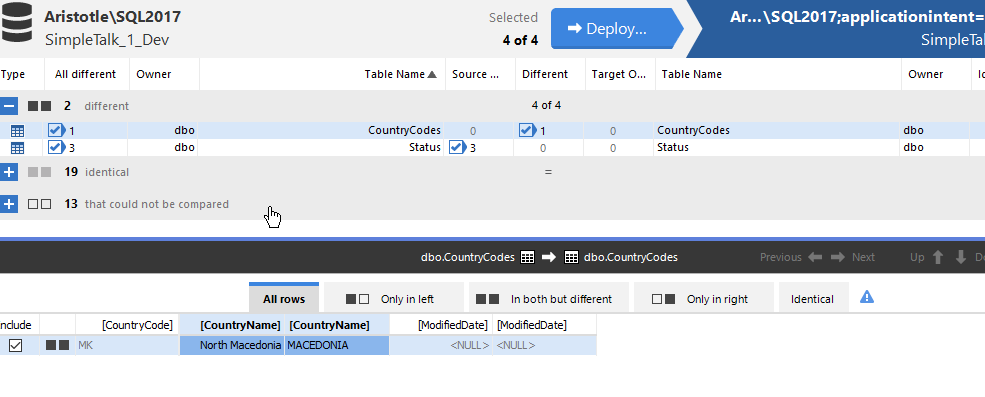
Once you have a comparison, you should see something like this image. Here I have two tables that are different (I selected all tables). The first, dbo.CountryCodes, has a difference in a row, different values in the name.

2023-04-14 13_47_56-SQL Data Compare - E__Documents_SQL Data Compare_SharedProjects_(local)_SQL2017.

The second, dbo.Status, has some rows in the source (left) that are not in the target.

2023-04-14 13_48_02-SQL Data Compare - E__Documents_SQL Data Compare_SharedProjects_(local)_SQL2017.

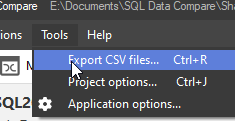
To export these results, I use the Tools menu. There is an option you can see below:

2023-04-14 13_48_08-

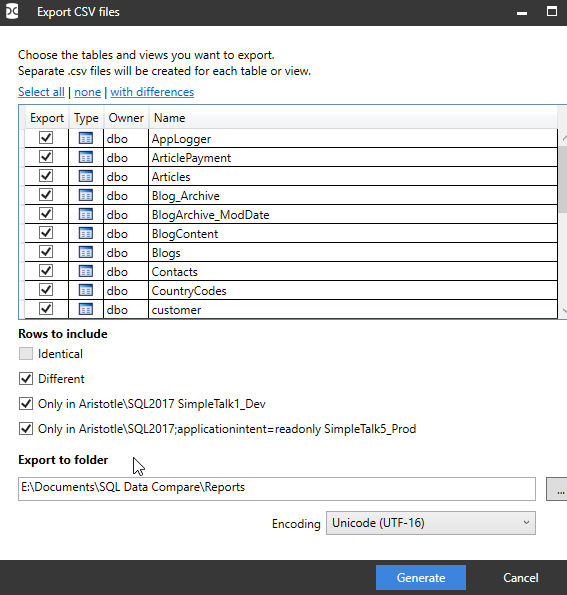
Once I pick this, I get a dialog with options. I can pick certain tables, or all. The defaults are all tables, and only show differences. Note the identical button is not selected.

2023-04-14 13_48_17-Export CSV files

If I open the folder in the dialog above (after clicking Generate), I see my files. There are separate files for each table and one with a summary.

2023-04-14 13_48_24-Reports

If I double click the dbo.CountryCodes.csv file, Excel opens, but not the way I like it. I see this:

2023-04-14 13_58_46-dbo.CountryCodes.csv - Excel

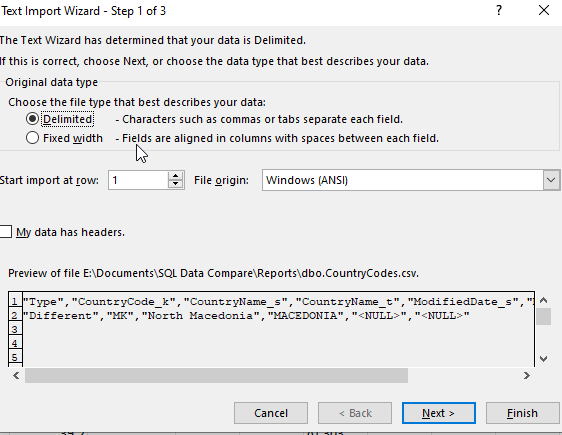
However, if I File | Open the file, I get the wizard for delimited files.

2023-04-14 13_59_00-Expenses 2023.xlsx - Excel

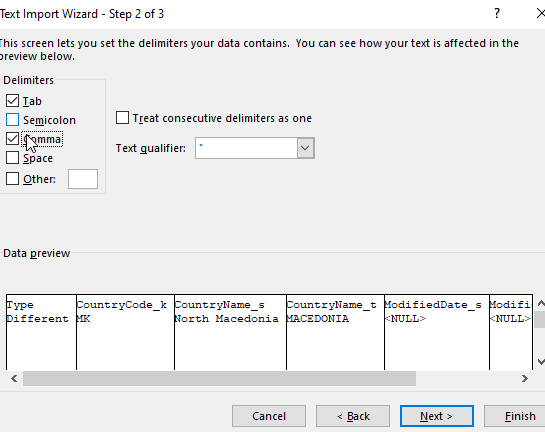
When I go to the second page and click “comma” as the delimiter, I see a better preview.

2023-04-14 13_59_05-Text Import Wizard - Step 2 of 3

I can finish this and I see my data. In this case, the first column lets me know this is changed data that has the same row with the same PK in both databases.

2023-04-14 13_59_22-dbo.CountryCodes.csv - Excel

Similarly, I get open the Status table file and see this. Here the first column lets me know this data is only in the first database, the source or left database, that I set in my SQL Data Compare project.

2023-04-14 13_59_50-dbo.Status.csv - Excel

The summary also needs the same open process and this shows me all tables, with lots of zeros. However, for my two tables, you can see there is 1 row noted in the Different column for CountryCodes and 3 rows only in the source (SimpleTalk_1_Dev) database.

2023-04-14 14_00_35-Results Summary.csv - Excel

I can then save these in Excel format if I like and send them around to colleagues.

Summary

You’ve seen how you can review SQL Data Compare results in Excel. I don’t know if your Excel will open the CSV with values in separate columns, or if you need to perform a File | Open as I did.

This is useful for sending to a business user that might need to make decisions about what data needs to be synched where. The hardest part here is explaining the _s and _t names for source and target.

SQL Data Compare is very handy for single GB data sets to compare. I wouldn’t recommend this for > 10GB, but under that, with good hardware, you should have success comparing tables or views.

If you’ve never tried it, download an evaluation today.

Posted in Blog | Tagged , , | Comments Off on Exporting SQL Data Compare Results to Excel

A Case for Document Storage

One of the challenges for both database developers and administrators is doing more, often with less. Many companies continue to grow their database estate, both in width with more platforms, and in depth with more instances of the platforms they have.  Some companies will look to shrink their staff, especially when adopting a cloud platform, while others may add more databases, but not increase staffing to match the additional load.

In either case, what many have found over the years is that the cost of labor is high. Both for developers that write code against databases, and administrators that manage those platforms. While licensing can seem to be a large number, compared to the cost of labor, it isn’t usually a significant number.

Often it seems administrators would prefer more of the same database platform. Developers often seem to ask for new types of database platforms, often some type of NoSQL data store. I ran across an article that makes a case for adding in document storage data stores to your environment, instead of just choosing am RDBMS. Labor is one of the big reasons for doing this. The other one is that for a given workload, the hardware cost is lower.

The article opens talking about the object/relational mapping problems. There is some truth to the time and effort to map an object in an application to a table (or set of tables) in an RDBMS. There is some knowledge required to do this, but I also think it’s an important skill for many developers. The same type of object mapping to a serialized JSON document is shown as being easier, and it is.

However, if you add or change your object, the application code to handle the document from the data store gets complex. Over time, you will have lots of “new” fields that don’t exist in older documents. How do you handle those? It’s not hard, but labor is required to write this code. And this code has to be maintained over time.

The other argument is that less hardware is needed, made by noting all the data you may need can be co-located with your object. This is what we would call denormalization in an RDBMS and leads to data duplication? Whether that is a problem or not depends on the amount of duplication. Certainly the structure of an application that often works to send or retrieve singleton rows is easier in a document database.

However, non trivial queries, which the author postulates are hard to write for developers, are likely hard to run for a document database. The load of querying across lots of rows, or updating them, is much higher in a document database. Depending on how often you update data, this can be an issue, and require more hardware.

Which is better? The classic “it depends” applies here. Database modeling is important in both cases. As I’ve worked with people that move to NoSQL databases, I find they struggle to model in that world as much as many of us struggle to model in the RDBMS world. I also find that a NoSQL database often is going to require some sort of data warehouse or other structure that is built for reporting across documents.

I’m not against the various types of NoSQL databases, but I also don’t think they are a panacea of any sort that magically makes building and operating an application easier.

Steve Jones

Listen to the podcast at Libsyn, Stitcher, Spotify, or iTunes.

Posted in Editorial | Tagged , | 4 Comments

AI Concerns

I hosted a webinar a few weeks ago about Artificial Intelligence and how it might affect data professionals. It was an interesting discussion with Kellyn Pot’Vin-Gorman and Brian Randell, with all of us having slightly different perspectives. Overall, we all agree AI is amazing and can be a useful tool for data professionals.

This week I’ve been in Redmond at the MVP Summit, and AI has been a topic among many MVPs. Lots of jokes have been told, no shortage of which dealt with getting rid of staff. Not that these MVPs want to see less staff, but they know that executives and managers might see all the AI hype about how GitHub CoPilot writes code and think they need less developers.

I don’t know if that is really how executives will view the world, especially as most IT departments have more work than resources to complete their list of tasks. I can see AI helping get more done, which might mean less hiring (or slower hiring) in the future.

There was an article this week talking about ways to protect your job in the age of AI hype. It was interesting in that the suggestions all revolve around bringing more value to your job. The suggestions about working in specialized areas, complex areas, being a better employee with documentation, these are all things that I’ve done in my career. It’s what I also see from many MVPs.

Maybe the most interesting item was to think about incorporating AI into your work now. It’s not necessarily an expert on your work, but it is a tool. As the models absorb more information and become better trained, they can be a level to help you get more work done. They can assist you in tedious work, which is something many of us can benefit from.

I am looking forward to getting access to CoPilot and keeping an AI tool up on my desktop, learning how it might help me, and maybe more importantly, where it won’t help me.

I can’t stop this trend, but I can better understand it and learn how it might fit with my daily work. Knowing that helps me better understand how I might have an informed and rational discussion with management about the advantages or disadvantages of this new technology.

Steve Jones

Posted in Editorial | Tagged , , | 2 Comments