Renaming a Column: #SQLNewBlogger

This is a short post on how to rename a column in a SQL Server table.

Another post for me that is simple and hopefully serves as an example for people trying to get blogging as #SQLNewBloggers.

I Typo’d a Name

I was testing something recently and created this table:

CREATE TABLE BinaryData
(
     BinaryDataID INT NOT NULL
         CONSTRAINT BinaryDataPK PRIMARY KEY,
     Emoji VARBINARY(16),
     UserPic VARBINARY(MAX),
     BinaryTexet VARBINARY(250)
)
GO

I didn’t realize at first that the last column was BinaryTexet and not BinaryText. I added data, wrote a few queries, and had done some testing. Using SQL Prompt is great, but it hid my silly mistake. As I went to send this code elsewhere, I realized my mistake.

I could have dropped the table, created a new one with the right name, saved the data or moved it, and done more, but that’s a lot of work. It also might cause me issues with the dependencies from other code. Not this column name, as any dependencies have to be fixed, but I could have other FKs or things that I don’t want to recreate.

I could, I mean I use version control and tools to make refactoring easy, but everything is more complex than renaming this column.

Renames

In SQL Server, we have an sp_rename function to handle this. I had hoped there was a way with ALTER TABLE ALTER COLUMN, but while I can change types, nulls, etc., I can’t change the name.

SQL is such a weird language.

Certainly for SQL Server. PostgreSQL and Oracle have an alter table rename column a to b in the DDL. We have a function. Vote for a cleanup here.

In any case, the syntax is: sp_rename <objname>, <newname>,<objtype>.

For me, the code is easy. I qualify out the old name:

EXEC sp_rename 'dbo.BinaryData.BinaryTexet', 'BinaryText', 'column'

If I try just the column name, even though this is unique in sys.columns, I get an error. I could do just the table and column like this:

EXEC sp_rename 'BinaryData.BinaryTexet', 'BinaryText', 'column'

One really interesting thing is that if I fully qualify things, I definitely don’t get what I want. Be careful here. Another reason why an ALTER TABLE RENAME COLUMN syntax should exist.
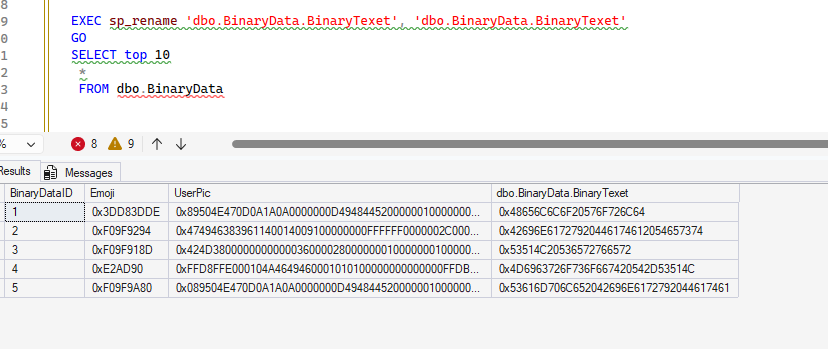
2025-12_0236

After all my experiments,  I can fix this:

EXEC sp_rename 'dbo.BinaryData.[dbo.BinaryData.BinaryTexet]', 'BinaryText'

SQL New Blogger

This was a short post I made after realizing I made a mistake. I took about 10 minutes to experiment with renames, and another 5 searching to be sure I couldn’t rename things.

In the experiment, I realized how I could break things, so I captured that mistake (and fixed it), and pointed it out. Showcase how you learn. For bonus points, write a blog where you use AI to help you do this.
Posted in Blog | Tagged , | Comments Off on Renaming a Column: #SQLNewBlogger

An SSIS Upgrade

I came across a post recently on the Microsoft Fabric blog about the evolution of SSIS 2025..I hadn’t heard much about SSIS in SQL Server 2025, so I thought this might provide some info on the investments that Microsoft is still making in Integration Services. I’ve run into a few people in the past year who are still heavily invested in SSIS and run packages daily. SSIS seems to be a technology that isn’t even close to dying for many organizations.

The blog starts well, delving into the security investments with the change to the SqlClient and TLS 1.3, as well as supporting Strict Encryption. I don’t know many people using this level of security, but it’s good to have SSIS support stronger security. There is also an upgrade for SSIS packages targeting Fabric Data Warehouses if they modify their approach.

There is also a mention of lift and shift into Fabric Data Factory as an early access program. I wonder how many organizations are looking to still run SSIS packages, but upgrade to Fabric. I’m sure there must be some, and I’m interested if any of you are in this situation. Many of us buy SQL Server licenses, so I would hope Microsoft could invest in a few new SSIS tasks, like SFTP at the least.

The rest of the post covers Fabric and Azure Data Factory, not SSIS. I understand that Microsoft would prefer everyone abandon SSIS and move to ADF/Fabric, but that’s not what a lot of customers want to do. Many of us have no real need for complexity beyond what SSIS does. What I’d really like to see is a local version of ADF. Many of us still run our own systems and plan to do so for years. If there isn’t going to be an investment in SSIS, which I do understand, then invest in a local version of ADF.

I doubt Microsoft has much interest in doing work here, especially as the trend towards lakehouses and Parquet files seems to drift further from the idea of SSIS moving data between systems. However, there is still a need for many organizations that might want to build packages to export their data to a data lake on-premises. They might prefer to host their own storage, use Polybase to query those files, and maybe grow into Fabric and Power BI over time.

Giving options is something Microsoft has often done in the past. Their successes often open the door wider for others to build on their platforms. Their failures are often in places where they try to force everyone to work in a particular way with a particular technology. Expecting everyone to move to ADF/Fabric feels like one of the latter decisions.

Steve Jones

Listen to the podcast at Libsyn, Spotify, or iTunes.

Note, podcasts are only available for a limited time online.

Posted in Editorial | Tagged , , | Comments Off on An SSIS Upgrade

Setting PK Names in Redgate Data Modeler

A customer was testing Redgate Data Modeler and complained that it auto-generated PK names. I had to test and discover if I could make things better, and I could. This post shows how.

This is part of a series on Redgate Data Modeler.

Adding a New Entity

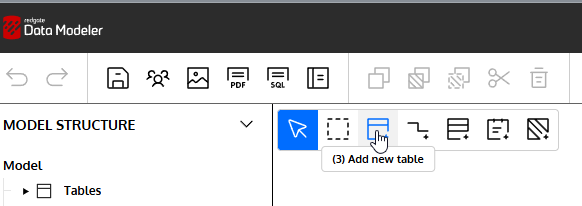
I can easily add a new Table to my diagram. I’ll click the New Table icon in the menu.

2025-12_0310

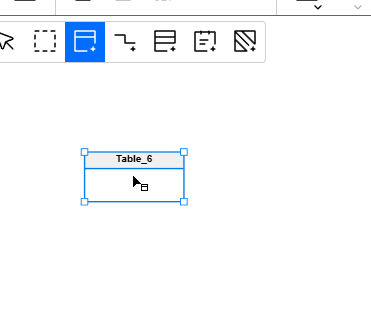
When I click in the design surface, I get a new table.

2025-12_0311

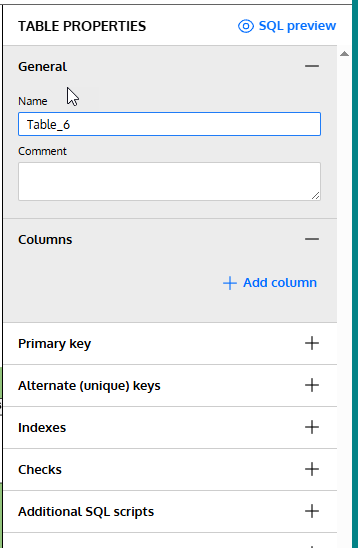
On the right, I see the table properties. I’ll need to fill these in.

2025-12_0312

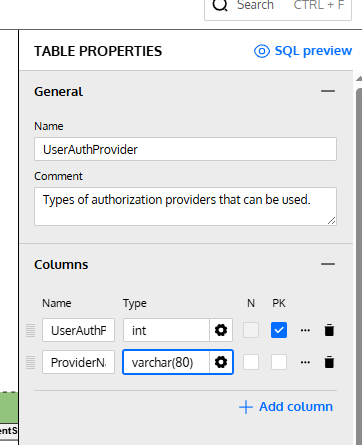
Let’s change the name and add a few columns to this design. Note that for the first column I checked the PK box. This will be my primary key.

2025-12_0313

These are fine for now. Let’s now add adjust the PK.

Setting the Primary Key Constraint Name

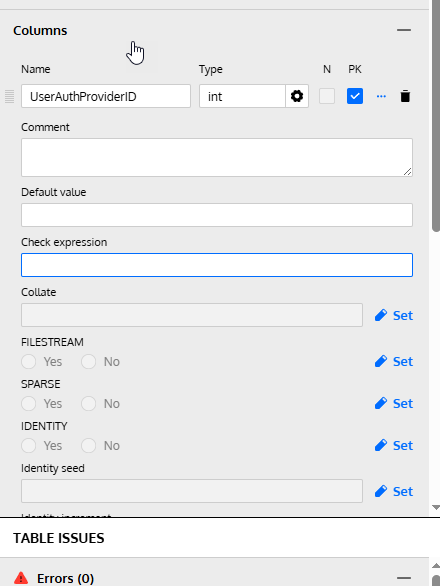
If I click the three dots next to the PK check, I get a lot of properties for the column, not the PK.

2025-12_0317

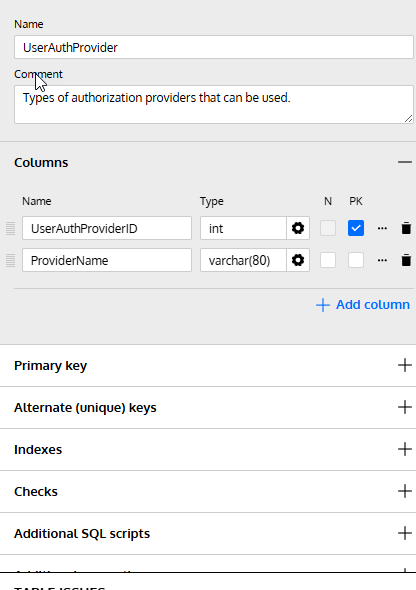
I need to go below the columns. Notice the sections below the column area. One of these is for the Primary Key.

2025-12_0318

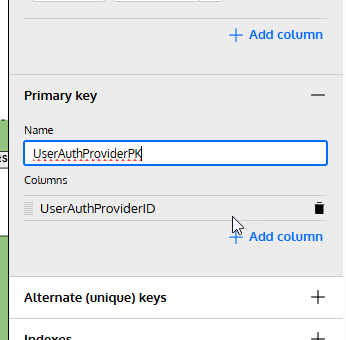
If I expand this, I can see the name field and columns. This was blank, but I typed in a name that makes sense to me. I could add columns as well here.

2025-12_0314

Checking the SQL

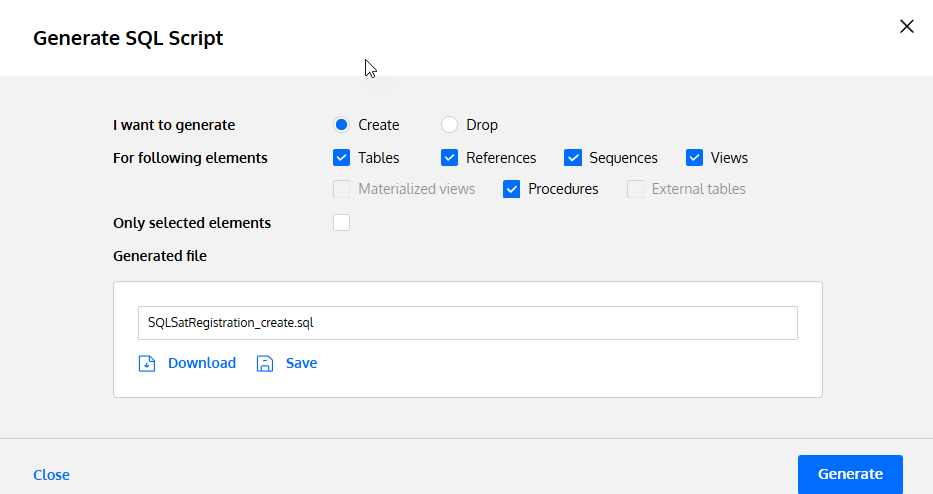
If I click the Generate SQL button from the top menu, I get a dialog.

2025-12_0315

I click the Save button, which will save this to the file specified. I’ve set this in my project before (which is another post), but I am trying to save to a single file for my code that updates.

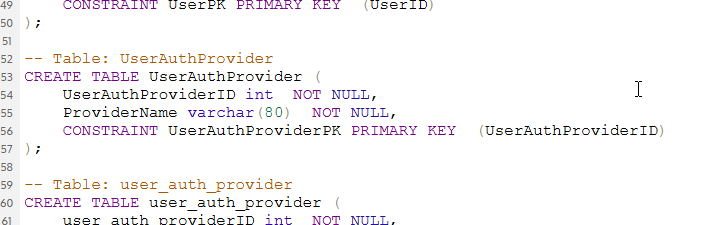
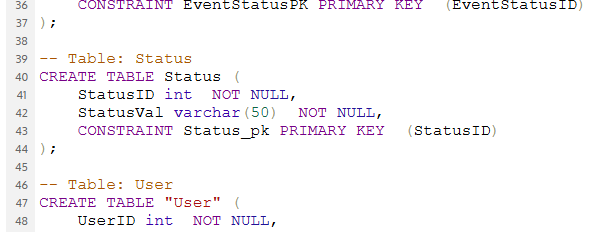
When I open this code, here is the relevant part of the file. Note that my PK is named appropriately.

2025-12_0316

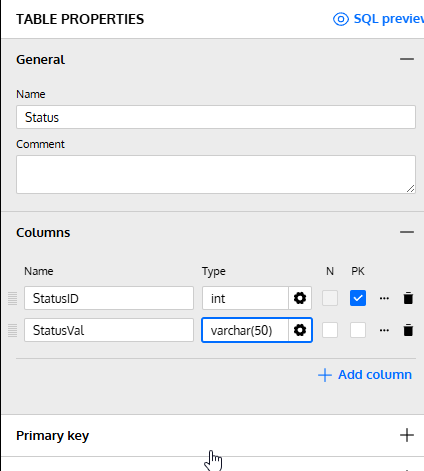
What happens if I don’t do that? I added another table, marked a PK, and this is what I see. First, my table (there is nothing set under the PK tab):

2025-12_0319

The SQL code shows a standard similar to mine, but different. I think a lot of people use the underscores, so I’m not surprised this is the setting.

2025-12_0320

Not bad, but not what I want.

Summary

The Redgate Data Modeler is a basic tool for now, but it does let you set a specific PK name if you want to enforce a standard. This can’t be set as a default, but I’ve submitted a feature request to change this.

At least I can customize what I want as I build something.

Give Redgate Data Modeler a try and see if it helps you and your team get a handle on your database.

Posted in Blog | Tagged , , | Comments Off on Setting PK Names in Redgate Data Modeler

Where Your Value Separates You from Others

I ran across a post that discusses what makes you a senior engineer (via Brent Ozar). The main point of the post is that there is a core skill that separates senior engineers from others, which is reducing ambiguity. When a senior engineer gets an ill-defined (or ill-communicated) request, they can deliver a solid, or even great, result.

When someone says “performance is poor,” what do you do with that? Can you build a plan to identify the issues and solve them? Or do you expect the customer to explain what is slow and why it’s slow? Do you ask what metrics they have showing things are slow? A senior engineer can ask questions to find the problem and then determine how to move forward.

The post also discusses the way many companies hire senior people, often basing decisions on years of experience and answering specific questions in an interview or on a test. It’s hard to interview and test a person who is given a vague requirement and develops a solution. Most interviewers don’t want to have to wprl that hard and compare what might be very disparate answers to ambiguous questions. How can you judge two people who give very disparate answers to questions with no clear answer?

It’s hard, and I know this because when I’ve run interviews that lightly describe a situation and let the candidate lead me to the next question, so that I can see how they work and think. It’s very hard to judge the end result and rate the candidate as effective. Often, I find myself deciding if I like the person more and if they fit in our company. That’s if I think they can probe to find information and make decisions when that information is incomplete. If they can’t probe and find a way to solve the problem without direction, that’s an issue.

And that really is the senior skill. In all fields, not just engineers or DBAs. Managers, customer service, analysts, and more. Can someone handle an unstable atmosphere and clarify, identify, simplify, and present a way forward? If they can, then they are likely someone to consider for a senior role. They still need expertise in their area, but can they get things done when they aren’t being directed?

Are they self-starters?

That might be the main thing I consider for senior people. Can they drive themselves and get things done, things we need done, but without a lot of direction and hand-holding? If a senior person struggles to move forward without more direction or supervision, then maybe they aren’t really a senior-level employee.

Steve Jones


Listen to the podcast at Libsyn, Spotify, or iTunes.

Note, podcasts are only available for a limited time online.

Posted in Editorial | Tagged | Comments Off on Where Your Value Separates You from Others