Daily Coping 9 June 2020

I’ve started to add a daily coping tip to the SQLServerCentral newsletter and to the Community Circle, which is helping me deal with the issues in the world. I’m adding my responses for each day here.

Today’s tip is to think of 3 things you’re grateful for and write them down.

This is similar to a previous tip, but this is a good exercise. As we often say in yoga, learn to practice gratitude.

Thing 1

I am grateful for my health. Despite a body that feels like it’s deteriorating as I get older, I am in good health.  I rarely need to go to the doctor, and I haven’t caught COVID. I can still snowboard, and while it feels really slow, I can still pull on the rowing machine at a decent rate. At 50+, I made it through a 5k row at a 2:05 pace. In college, I was doing about 1:56. Not bad.

Thing 2

I am grateful for Simon Galbraith, CEO of Redgate. For giving me this amazing job, for leading Redgate during times of struggle and success, for the culture and respect which he has implemented in our organization. He leads, and does so in ways that make me think, inspire me, and challenge me.

I’ve said it many times, that the highest praise I have for him is that he has built the kind of company that I would want to build if I tried to start one.

Thing 3

I am grateful for the way my children drive the world forward. All different, all living life in different ways, with different thoughts and different actions. I am proud of them, and while I don’t always agree with their choices, I am grateful that they have chosen to be themselves, live their lives, and give me hope for the future of my community and this world.

Posted in Blog | Tagged , , | Comments Off on Daily Coping 9 June 2020

What’s a Normal SQL Server?

Many of us have worked in environments that have a number of SQL Server instances. Different versions, editions, and mostly different hardware profiles. We deal with different applications and software that places different demands and requirements on our database systems. Some of us are even dealing with multiple datastores, trying to integrate SQL Server with Oracle, PostgreSQL, Elasticsearch, Redis and more.

Keeping an inventory of instances and patches can be a challenge. I hadn’t thought this was a big problem, but I’ve been surprised how many people like the Estate Management Versions page in SQL Monitor. This gets a lot of use, as people work to keep track of their systems. With that in mind, I wonder how many people have to support the “average” SQL Server that Brent Ozar supports. He runs the SQL ConstantCare® service for his customers, and regularly reports on average data every quarter.

In his latest report, which contains data from over 3000 servers, we get a picture of what various organizations run for their instances. The version breakdown is what I expect, and I’m not surprised that 2016 is the most popular. This was a major release, with lots of changes. I think 2008 R2, 2014, 2017 were relatively minor releases. Few changes, and not good timing relative to other releases.

The data shows most people have supported versions, and I think some of the licensing rules and breaks to lead many people to think about getting Software Assurance to upgrade once in awhile. I also think it makes sense that many people manage relatively small databases, well under 125GB. If you do the math, 47% of these instances are these relatively small sizes. However, it is interesting to see nearly 15% of his clients are > 1TB. That’s quite a spread.

With data sizes like this, you see lots of smaller hardware sizes. I don’t know how this might compare with your organization, but it’s interesting to think about how you might fit into these averages. Is your organization doing a better or worse job of giving you resources for your data size? Keep in mind, there isn’t correlation here, so you don’t know if the 30GB database has 4 cores or 24 cores.

I think having data like this is interesting. I do wish Microsoft would release more specific stats, like the version counts and database sizes, with hardware averages for those data sizes. I know why this doesn’t make sense for them to release the data, but I still wish they would let us know more. As Brent says, they tend to present on really recent technology, which many of us might not use. I’m sure many of you have a variety of instances, but you’ll easily be able to see if your spread of instances looks like Brent’s client base.

Steve Jones

Listen to the podcast at Libsyn, Stitcher or iTunes.

Posted in Editorial | Tagged | Comments Off on What’s a Normal SQL Server?

T-SQL Tuesday #127–Non SQL Tricks

tsqltuesdayToday is T-SQL Tuesday, with this month being hosted by Ken Fisher. This is an interesting topic, looking at tips, but ones outside of SQL Server. Since many of us are data professionals, I think this is a place where I might learn a few things from others. Looking forward to the recap.

I spent a number of years working in network administration and desktop work, as well as some software development teams, so I have to think about what I think makes a good tip.

A Quick Fix with Contig

One of the problems with a machine that runs out of memory or disk space is that it will act slow and suspicious. It often isn’t obvious that you’ve run out of resources, since we often don’t think about a slow degradation for RAM or disk space. Usually we’re looking for a runaway process, a virus, or something else. I’ve been surprised sometimes that I spent an hour, or watched someone else do this, before checking disk space.

These days Windows is better about warning us when space is low, but it can be easy to ignore this or defer action until a later time when you’re busy. This tip won’t help you with RAM, but it can help with storage, which often affects things like pagefiles.

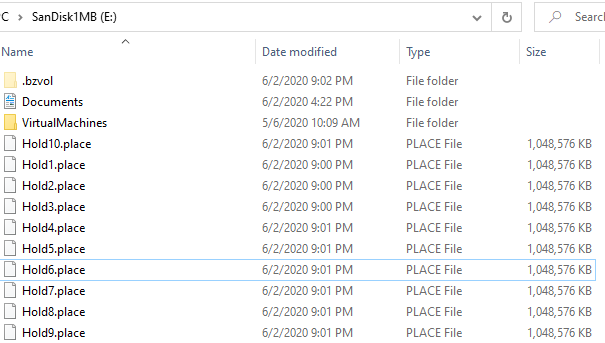
Contig.exe is a utility from the Sysinternals utilities. It is designed to defragment files, but it can be used to create new files. Of whatever size you want. I’ve written about this before, and I use this on my machines. Whenever I get a new drive, I usually make 10 new files, each 1GB in size and keep them around. This post reminded me to do this on a new drive.

2020-06-02 21_03_35-SanDisk1MB (E_)

If I run low on space, I can get 10GB back quickly, without searching my filesystem for something to delete.

You could do the same thing with a large ISO if you want, but keeping a file ready to delete can be handy. It always seems I run out of space when I’m in a hurry to get something else done.

Posted in Blog | Tagged , | 3 Comments

Social: A Small Step to Address Poor Past Behavior

Tl;Dr – This is about changing your main branch in git to main. However, please read and think about what I am saying here.

When I started working with Version Control, the main branch was named trunk. I worked with code and we always branched away from trunk, which was our source of truth. I have no idea of the origin, though people seem to think this relates to trees. That makes sense.

Then why master? No idea. The inventor of Git is Linus Torvalds. He’s been accused of poor behavior, though I don’t know I think he is racist. Git was supposedly chosen as it’s an unpleasant person in British slang. That makes sense.

I followed him early on, and remember trying to get Linux 0.6 working on hardware. I was fascinated with his work, and I hope he chose “master” as the moniker for the main branch because of the verb definition rather than the noun. Who knows?

In any case, technology is littered with the use of “master” in our terminology. Replication, especially, but HA tech and in many places where we distribute something from one machine to another. I would like to think this is idea of one with more/better knowledge (the master, in the Kung Fu sense), distributing that to others.

However, there is the connotation of control.

The IETF agrees and has draft terminology change recommendations. In line with that, I saw a note from Scott Hanselman on changing your git default branch, this after I saw a few people this weekend noting they were submitting PRs to make the change.

I decided to do the same. I don’t know how to do this on GitHub without a local repo, so I’m following Scott’s process.

git branch –m master main
git push –u origin main

This moves all the code (all commits and history) to a branch called main. Then pushes this up and tracks it.

Once it’s there, I need to go to the repo settings and change the default branch to main and delete master. This will cause some issues on laptops, but those are up to date, or they have minor unpushed demo changes that I can abandon. I’ll then pull down the new structure of the repo.

Don’t do this haphazardly. Communicate with your team and ensure everyone is aware of the change. Then slowly work your way through the repos. It’s a chore but a small one. One I’ll be working my way through until I’m done.

Posted in Blog | Tagged , , | 3 Comments