Missing Data

I gather some data regularly about my life. I examine and look for trends and anomalies every week, and use the data in data analysis to help me make decisions. I get this data from my watch, a Garmin Forerunner 645, which tracks a number of data points for me. Some data points are recorded automatically, some I set, but I have come to appreciate that information.

Recently I had to get a replacement watch after a bit of a hardware failure. Huge props to Garmin for replacing my out-warranty, 3 year old watch at no cost. During this time, I was without a watch for almost two weeks, and I really noticed the lack of data.

My watch gathers data on sleep, which I often check to see when I’ve struggled at night and wake up tired. Where was my time spent during the night, with lots of movement and wakefulness or more deep sleep? I don’t need a high level of accuracy here, but just something that helps me to think about what I might have done differently the previous day with diet, with stress, with exercise (or lack) or even emotional coping. During my week, I often check the step count, just to see if I’ve taken breaks and gotten moving, or am I sitting too much. I look at my heart rate regularly, both for the long term trends and the specific exercise to see if I’m trying hard enough.

Losing some of this data isn’t really a big deal, but it is something I need to account for, since this is a pretty big hole in my system. As I look for trends and compute averages, I need to account for the missing data points. If I were building a report for myself, I might want to ensure the missing dates are still shown, albeit with no data. I can’t enter zeros here, because imagine 2 weeks worth of zeros in a month or resting heart rate data. I might think I’m much more fit than I am!

There are plenty of solutions and ways to handle both aggregations and visualizations, but as data professionals, we need to ensure we know how to, and make sure we do, account for missing data points. This becomes especially important with sensor data, but even sales data can be affected. We can, and do, lose data for a variety of reasons, and we should also be prepared for those situations.

Steve Jones

Listen to the podcast at Libsyn, Stitcher or iTunes.

Posted in Editorial | Tagged | Comments Off on Missing Data

Daily Coping 10 June 2020

I’ve started to add a daily coping tip to the SQLServerCentral newsletter and to the Community Circle, which is helping me deal with the issues in the world. I’m adding my responses for each day here.

Today’s tip is show your appreciation to those who are helping others.

There are many people helping others these days. Healthcare workers, activists, and plenty of “essential” workers that have been risking their own health for income, for employment, and to provide for others.

In my area, many of these people have to wear masks, by law (or decree), all day while working. I can see many of them sigh with relief when they can remove a mask.

Paul Randal and Tim Radney have been printing lots of masks. Both of them have been graciously donating these to people around the US, along with plenty of others in the SQL Community. Redgate donated some money for supplies, and I donated some as well when I asked them to send me masks.

I’ve been carrying these around in my car, bringing them into various businesses, groceries, gas stations, and more. I’m offering these to workers, including some nurses I know, to ease the pain of wearing masks all day long.

Posted in Blog | Tagged , , | 2 Comments

Creating a Repository from VSCode–#SQLNewBlogger

I’ve been working with a few different git clients, and trying to write some articles to help people get started. As I do this, I thought it was interesting that I could initialize a repository from within Visual Studio Code and decided to make a short post.

If I want to open a folder in VS Code, I can also create one from that dialog. Here I clicked the Open Folder item and then browsed to my git folder. I named this “GitTest”.

2020-05-28 13_23_53-Open Folder

Once this is open, I see it in VS Code as the open folder.

2020-05-28 13_24_06-Welcome - GitTest - Visual Studio Code

Now I click the Source Control icon in the menu. Since the folder is open, and it’s not a repo, I see the “Initialize Repository” button in this blade. I’ll click that.

2020-05-28 13_24_16-Welcome - GitTest - Visual Studio Code

I checked from the command line, and saw this was a git repository. Now I’ll create a new file. I click the new file icon, give it a name, and enter some code.

2020-05-28 13_26_59-experiment.sql - GitTest - Visual Studio Code

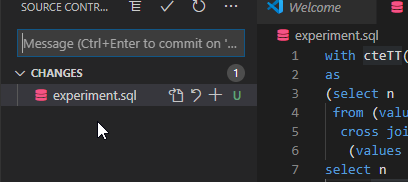
Now when I go to the Source Control tab, I see the file as one that’s changed. I can now enter a commit message and commit it if I want.

2020-05-28 13_27_04-experiment.sql - GitTest - Visual Studio Code

If I go to git, sure enough, here’s my untracked file.

2020-05-28 13_27_18-cmd

That’s it. I can now follow the normal commit process in VS Code for this repo.

SQLNewBlogger

Working with different IDEs and learning to be efficient is important. This is one of those places where I was able to easily learn a skill and spend 10 minutes writing about how it works.

Putting this down is a nice showcase of skill, and learning to work better. You could do this as well and help drive that someone might ask you in the interview.

Posted in Blog | Tagged , | Comments Off on Creating a Repository from VSCode–#SQLNewBlogger

Adding the Social Headline Topic

The world is changing, and the activism is infectious. I’ve tried to be fairly apolitical and unoffensive for most of my career. I definitely have not always succeeded, but in general rules, I’ve avoided most controversial topics, tried to avoid profanity, and been polite in disagreement.

I think those are good general rules, but I don’t think I can be silent about some of the difficult topics impacting the world today around #BlackLivesMatter, LGBTQ issues, treatment of women, and more. These are not political topics, in most cases, but just basic humanitarian issues.

I’ve added the tag, social, and will prefix posts with “Social:” as I discuss and debate these items in my mind.

If you are not interested, please ignore these posts.

If you wish to comment, I will respond to serious questions, but will ignore and disengage from trolling.

If you wish to make a joke  or use irony, sarcasm, or any other technique, please refrain. I see enough of this on Twitter, and honestly, most of you suck at it. You’re not funny, and it comes off poorly. I try to be careful here myself, because I’m not funny either. I might be able to make a joke, but as a public speaker for over a decade, I know it’s a rare occurrence.

I am also looking to drop posts of this nature on Friday, trying to give them time to grow and mature in my mind.

Posted in Blog | Tagged , | 2 Comments