Tag: licensing

  • SQL Server Licensing is Simple

    Over the years I’ve had no shortage of licensing questions for SQL Server. At times it’s felt a little crazy. Look at the licensing guide. Choose EE or SE and the number of cores. Then check if you’re using VMs. Oh, and consider the cloud, and which cloud you’re running a workload on.

    It’s simple right?

    It can seem confusing, and at times I’ve wished Microsoft would make it simpler. And perhaps even give us some add-ons, like adding some additional hardware capabilities (cough more RAM *cough) in SE.

    Then I run into something like the introduction to Oracle licensing. This is one of the smaller guides on a site devoted to Oracle licensing. There are numerous articles on there, with lots of information, perhaps too much, to help anyone get a handle on this process. There are even companies (one, two) built around helping you manage Oracle licenses.

    There’s a core factor table, where you need to figure out how to adjust your “license cost” based on the CPU. That’s after you pick the edition, and likely before you go into the other features you might need. I’m guessing this is why a lot of people might just pay for the Unlimited license and stop worrying. I think this is also why Oracle is still such a huge company and worth billions (or trillions?) of dollars.

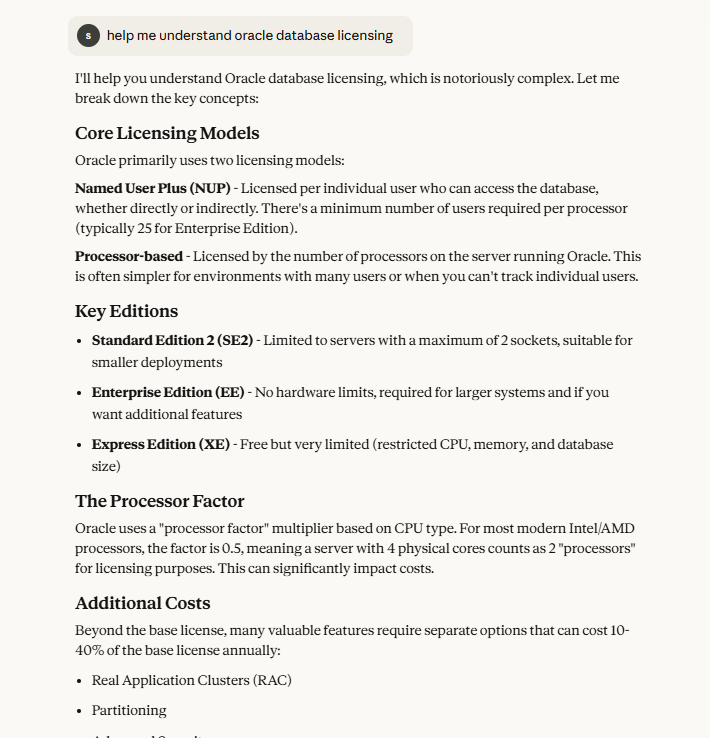
    I actually asked Claude to help me with Oracle licensing. I got these (partial) results, which talks about the different core licensing, editions, and then other costs. As I ask for more details in any area, this gets very complex and confusing. While some of the rules for SQL Server can be confusing, and certainly the HA and virtualization guidelines sometimes leave something to be desired, overall, I find things simple.

    I like simple.

    Over the years, many software companies have made licensing more complex and confusing to customers. Often this results in more profit for them without much benefit for the purchaser. Not all vendors do this, but Oracle certainly has created a complexity that spawned a whole business model for a few companies. SQL Server licensing is simpler, and I’ve learned to appreciate that.

    Steve Jones

    Listen to the podcast at Libsyn, Spotify, or iTunes.

    Note, podcasts are only available for a limited time online.

  • New Cloud Licensing Limits

    Licensing is always a complex discussion with SQL Server. Depending on the way you run it, the edition, the version, whether you’ve purchased Software Assurance, and more, you might struggle to ensure you are in compliance with Microsoft’s terms.

    This can be even more complex when you move to the cloud, as sometimes your setup could include a license, and sometimes it doesn’t. If you lift-and-shift to cloud VMs, Azure lets you bring your existing licenses with the Azure Hybrid Benefit, which is tempting for organizations that want to get out of the data center business and move their workload to the cloud.

    However, that isn’t necessarily the same for all clouds. While Amazon lists various ways you can bring your licenses to AWS, Microsoft hasn’t felt that was legal. They’ve noted in 2019 that their “cloud partners” couldn’t support workloads on non-SA licenses. I can’t quite determine if SA licenses can be used, as lots of information out there is conflicting. Microsoft’s FAQ seems to support the idea that you need dedicated hosts, not just any shared VM.

    Not all cloud providers count, however. This week Microsoft noted that some cloud providers can let you run your workload by bringing your licenses. These are smaller providers in Europe who filed complaints. Likely these providers can’t offer the scale or pricing of GCP, AWS or Alibaba, so they aren’t as big a revenue threat as these providers.

    I don’t know what I think is the right thing, as once I’ve purchased a license, why does the location or ownership of the VM count? I ought to be able to run the software within the same guidelines in Rackspace, EC2 or GCP just as I would on-premises. However, such is the strange world of software licensing.

    If you deal with licensing, I’m sorry, but also, you should note that there are rules and restrictions when you move to the cloud. That’s something I see increasingly happening in many organizations, so educate yourself so that you can make the right recommendation. And when you get ready to purchase licenses, think about how SA not only affects upgrades, but also the flexibility of migration.

    Steve Jones

  • Renting Features

    The licensing, use, and ownership of software has been quite a contested topic for years. Many people have assumed they “own” the copy of Quicken or Halo that they bought, but modifying or even reselling the bits has been a contested right by many vendors. It seems that courts seem to lean towards the perpetual rental of those bits rather than ownership.

    We’ve gotten used to that in software, but what happens when this extends into the real world? There is a piece at Ars Technica about BMW looking to “unlock” features on their cars if owners want to pay for them. These are things like heated seats or perhaps sports suspension that are installed, but not activated. You could subscribe to the feature on a trial basis, and then activate it for a year or two if you wanted to pay a fee. The interesting thing here is that you could even do this with a secondhand car.

    The comments from many people are disparaging, and rightly so, since so many vendors have looked to make money with these options, often in a way that isn’t quite fair for the consumer. There is certainly concern and outrage about the cost of these features if they can be installed in every car without payment, and there are weight/fuel considerations as well. While heated seats might not use more fuel, I’d assume something like adaptive suspension or extra speakers in a sound package do reduce mileage.

    In some sense, I do understand this approach. I’ve purchased computer hardware with extra CPU and RAM that could be “rented” for a short time, or purchased. In the case of a car, I’d like to be able to “purchase” heated seats forever with a similar charge to what I’d initially pay. Or maybe a rental makes sense if this includes a warranty while the item is rented. Certainly being able to turn this on later on a secondhand car would be great. There’s also the idea that you could turn off a feature you didn’t like and stop paying.

    I also understand the cost structure here. If every car is built the same, the costs of manufacturing go down, even if there is some loss on a percentage of customers not using the feature. If too few turn this on, I’m sure BMW (and others) abandon the idea. If enough do, I expect we’ll see other features, especially the electronic ones, being added to the list of options.

    Ultimately, the use of software to lock features, and unlock them, makes sense in some cases and not in others. The devil is in the details, and certainly I think companies need to tread carefully here, ensuring they are pricing the options in a fair way. I also think they need to account for perpetual ownership as one of the options.

    Cars are notoriously modifiable, and I do think this will succeed. I’m sure there will be jailbreaks and unlock codes available all over the Internet, but I’m not sure this will stop vendors from renting features. There are ways people can modify iPhones already, though I’m not sure most consumers care.

    Steve Jones

    Listen to the podcast at Libsyn, Stitcher or iTunes.

  • Licensing Audit Advice

    I’ve never been through  a licensing audit at work, but I have been worried about them a few times in my career. A few bosses have warned me about them possibly coming. While I’ve tried to ensure that the organizations I worked for were compliant, I’ve always worried about losing track, making a mistake, or mis-interpreting the EULA rules. Those EULA rules and licensing guidelines are not written for most people to understand, and the verbiage is ambiguous at times.

    I saw an article containing advice on going through a licensing audit that caught my eye. This was for an Oracle audit, but I suspect the advice would be similar if this were for SQL Server or any other product. Since an audit is a legal proceeding, it’s worth treating any licensing audit as you would a legal matter.

    I am not a lawyer, and don’t take this to be advice or a recommendation. These are just my thoughts. For me, I would try to go slow with everything. Not to delay, but to be careful and sure of what I was doing. I would concentrate and read all documents carefully, being sure that I know what they mean, asking for clarification if there is any doubt, and ensuring my organization’s legal representative was available for questions.

    I’d especially be careful about only answering questions and not being overly talkative and volunteering information. I’ve seen plenty of people get into trouble because they talk more than necessary. That might be good advice for life in general: listen more; talk less.

    SQL Server, unlike many products, can be tricky because no license key is really checked. I’ve seen scripting and manual processes use the same product key for ever installation. There’s nothing fundamentally wrong with this, but it does mean that someone is still responsible for ensuring that licenses are being tracked against installations and upgrades.

    While I have no desire to deal with licensing, I know that if I act as a DBA in any way, it’s likely part of my job. I would (and have) tried to get someone in an Accounting role to keep track of purchases and usage of licensing, updating them whenever I install or decommission an instance. At least then we have more than one person tracking the data and potentially another person that might be in charge of handling the audit ;).

    Steve Jones

    Listen to the podcast at Libsyn, Stitcher or iTunes.