I was going through a few of the Redgate products with a customer recently and they wanted to perform some validation of the build and release process with SQL Change Automation without setting up Azure DevOps or Jenkins or any server. Not a bad idea, and a good way to actually learn how to do things.
Working with PoSh is a little funny, since many of the Redgate cmdlets require objects, not strings, so this is a quick post on how to get a build working and output a nuget package with your database code.
Prerequisites
The things you need to do before we get started:
- Have a SQL Server instance you are a sysadmin of (or at lease create/own dbs)
- Install SQL Change Automation
- Set up a SQL Change Automation Project
- Create a folder for storing build artifacts
The Script
I’m going to show the script first, and then I’ll describe how a few things work, since I expect some people want to just get a build working.
# Build script for SCA projects
param( $OverrideVersion="3.2")
# Instance variables
#    BuildInstance - SQL Server instance name for building
$BuildInstance = "Aristotle"

# Database Variables
#    BuildDB - existing database used for build connection. Won't be altered
$BuildDB = "builddb"

# Package Variables
#    PackageID - Set the nuget package name to be used
#    PackageVersion - suffix on nuget package id.
$PackageID = "SimpleTalkDB"
$PackageVersion = $OverrideVersion

# Path variables
#   ProjectFile - full local path to the SCA project file (.sqlproj)
#   BuildArtifactPath - Path where the Nuget package is stored
$ProjectFile = "E:\Documents\git\SimpleTalkDemo\SimpleTalkDB\SimpleTalkDB.sqlproj"
$BuildArtifactPath = "E:\buildartifacts"

# Debug
# Use Continue to get more output
$DebugPreference = "SilentlyContinue"

# Setup database connections using variables from above to the build instance
$BuildConnection = New-DatabaseConnection -ServerInstance $BuildInstance -Database $BuildDB

# Build the database with a validate
$ValidProject = Invoke-DatabaseBuild $ProjectFile -TemporaryDatabaseServer $BuildConnection

# Get the artifact and write to disk. Note the name comes from the package vars above.
$buildArtifact = New-DatabaseBuildArtifact $ValidProject -packageId $PackageID -PackageVersion $Version

Export-DatabaseBuildArtifact $buildArtifact -Path $BuildArtifactPath
This is a basic script that validates a SQL Change Automation project and packages up a particular version of your project.
The way this works is as follows. First variables. For the build I need to change these:
- BuildInstance – where will I run the build
- BuildDB – I just need an existing database for the build. We actually won’t use this.
- PackageID – Name for the nuget package
- PackageVersion – What version. This can be passed into the script as a parameter
- ProjectPath – Where is the sqlproj file from SQL Change Automation
- BuildArtifactPath – Where am I storing the artifacts.
The flow of the script is:
- Set variables
- Create a connection to a SQL Server (New-DatabaseConnection)
- Build, which is to perform a project validation on a SQL Server (Invoke-DatabaseBuild)
- Create the artifact in memory (New-DatabaseBuildArtifact)
- Write the nuget package to disk (Export-DatabaseBuildArtifact)
From here, I’d use the Nuget package as the start of a release process, another post for another day.
I can override the package version with a parameter, so I can enter this on the cmd line:
.\builddb.ps1 3.3
That gives me a build that works on my system.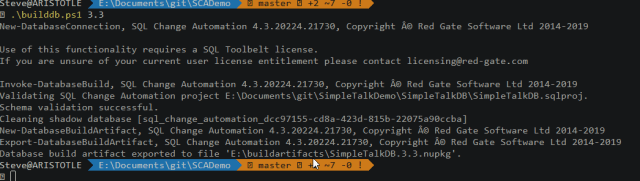
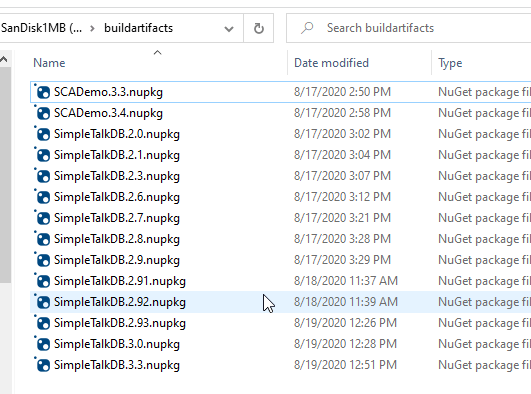
In my folder for BuildArtifacts, I see the new package.
Give it a try, and let me know if this works for you.




 Voice of the DBA